50 Things to Do on Your Phone When Bored (That Aren’t Scrolling)
You are already holding the phone. That is the part every other article skips — they open by telling you to put it down, which is not why you searched. You do not need a lecture on screen time. You need something to do on your phone that is not the fourth lap of the same three apps.
Here is the thing nobody says clearly: the problem was never the phone. It is that feeds have no bottom. There is no natural place to stop, so you never stop, and you end up more restless than when you picked it up. Everything below has an ending.
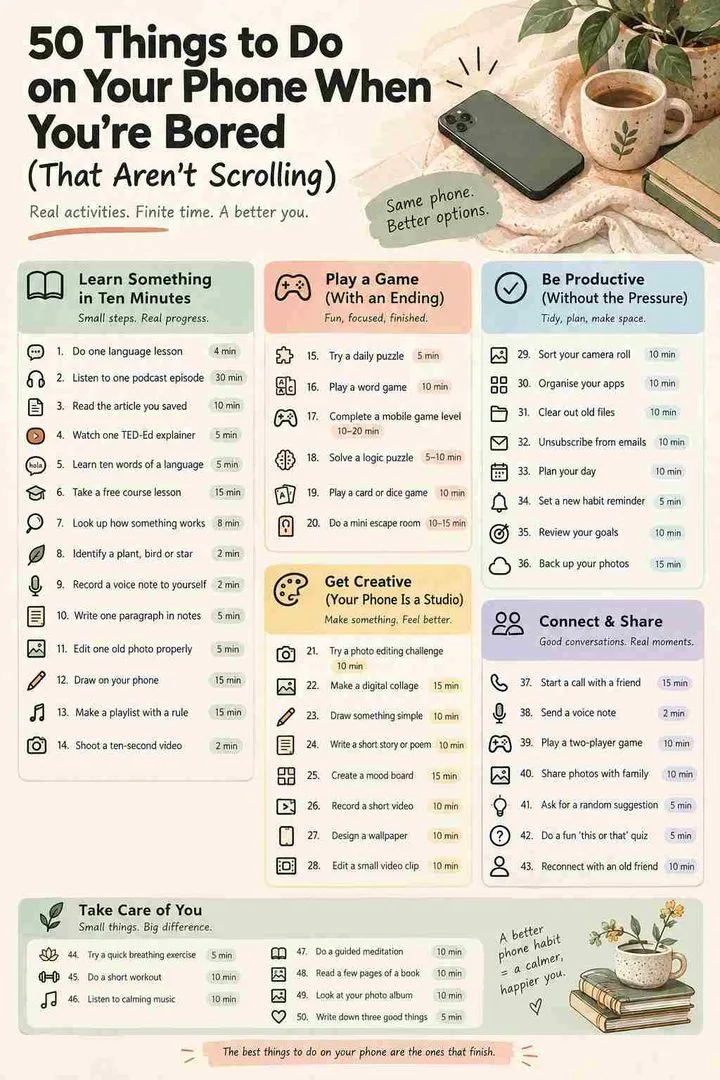
The best things to do on your phone when bored are the ones that finish: learn a language for ten minutes, record a voice note, sort your camera roll, play a daily puzzle, read a saved article, or start a game with whoever you’re on a call with. The rule is simple — if it has a bottom, it counts. If it scrolls forever, it doesn’t.
The Off-Feed Test
Before you open anything, ask one question: does this end?
A daily puzzle ends. A ten-minute lesson ends. A voice note ends. A podcast episode ends. A feed does not end, and that is the entire difference between using your phone and being used by it. This is not about being productive on your phone or feeling guilty about screen time — it is about whether you get a moment where your brain says done and hands you back your attention.
- Has a bottom: lessons, puzzles, episodes, chapters, a photo album, one recipe, one workout, one call.
- Has no bottom: any feed, any For You page, any comment section, any recommended-videos rail.
- The test in practice: if you cannot picture what finishing looks like, it fails.
Everything in the fifty below passes. They are grouped by what you actually want right now, not by app category.
Learn something in ten minutes

Ten minutes a day genuinely beats one long Sunday session, because the thing that builds a skill is returning to it, not sitting with it. These are the useful things to do on your phone that leave you slightly different than you were.
1. Do one language lesson — 4 min
One Duolingo, Busuu or Memrise unit. Not a streak goal, not an hour — one unit, which takes about four minutes and ends with a screen that says you finished.
2. Listen to one podcast episode — 30 min
Pick a single episode on something you know nothing about rather than subscribing to a series. One episode has a bottom; a subscription queue does not.
3. Read the article you saved three weeks ago — 10 min
Everyone has a graveyard of saved links. Open the oldest one. If it is no longer interesting, delete it — that counts as finishing too.
4. Watch one TED-Ed explainer — 5 min
Five minutes, animated, on something like why we hiccup or how black holes die. Genuinely better made than they need to be.
5. Learn ten words of a language you will never study — 5 min
Not to become fluent. Just to know how to say thank you in Portuguese. Small, closed, oddly satisfying.
6. Take a free course lesson — 15 min
Coursera, edX and Khan Academy all work fine on a phone. Do one module. Nobody said you have to finish the course.
7. Look up how something you use every day actually works — 8 min
Your fridge, traffic lights, why bread rises. One Wikipedia article, read to the end, then close it.
8. Identify a plant, bird or star — 2 min
Point your camera at it. PlantNet, Merlin and Sky Guide all do this and all of them make a walk more interesting afterwards.
Make something — your phone is a studio
The most underused thing about a smartphone is that it is a recording studio, a darkroom, a sketchpad and a word processor that happens to also have social media on it. Making something is the fastest cure for restlessness there is, and if it takes hold, our guide to things to draw when bored is the next step.
9. Record a voice note to yourself — 2 min
10. Write one paragraph in your notes app — 5 min
Not a journal habit, not a system. One paragraph about today. If you want a starting point rather than a blank screen, use a prompt.
11. Edit one old photo properly — 5 min
Pick a photo you like, open Snapseed or Lightroom, and actually work it — crop, curves, colour. Five minutes and you will see the difference.
12. Draw on your phone — 15 min
Ibis Paint, Procreate Pocket or even the markup tool in your photo app. Finger drawing is bad drawing, which removes all the pressure.
13. Make a playlist with a rule — 15 min
Not a mood playlist. A rule — only songs from one year, only songs under two minutes, only songs your mum would know. Constraints make it fun.
14. Shoot a ten-second video of something ordinary — 2 min
Rain on a window, your street, the kettle. It is the most low-stakes creative act available and you already have the camera.
15. Make a song in a tab — 20 min
GarageBand on iPhone, or BandLab on either platform, both free. You will not make anything good. That is not the point.
16. Write a message you have been putting off — 5 min
Not an errand — the nice one. The friend you keep meaning to reply to. It ends, and it improves something real.
Sort your life out in five minutes
Small closed loops. Each one takes less time than the scroll you were about to do, and each one leaves the phone slightly less annoying to use afterwards.
17. Delete 20 photos — 5 min
Not organise your whole camera roll. Twenty photos. Blurry ones, duplicate ones, screenshots from 2023. It is oddly addictive once you start.
18. Unsubscribe from five emails — 3 min
Five, then stop. Do this once a week for a month and your inbox becomes a different place.
19. Clear your home screen — 5 min
Move everything except four apps into a folder or the app library. The friction alone changes how much you open things.
20. Set up screen time limits properly — 5 min
Not to punish yourself. Put a fifteen-minute cap on the one app you already know is the problem, and leave everything else alone.
21. Back up your phone — 10 min
Boring, ends, and one day it will be the reason you do not lose everything.
22. Update your passwords on two accounts — 5 min
Two. Not all of them. Use the password manager your phone already has built in.
23. Empty one folder in your downloads — 5 min
Yours has hundreds of files in it and you know it.
24. Fix the notification that annoys you most — 1 min
Find the one app that buzzes for nothing and turn it off for good. Ten seconds of work, months of relief.
Play something that ends
Games are fine on your phone. Endless ones are the problem. Everything here has a round, a level or a daily limit — and for the full breakdown of what to play alone, in pairs or in a group, see our guide to games to play when bored.
25. Do the daily puzzles — 8 min
Wordle, Connections, the Mini crossword. Together they take about eight minutes and then they are finished until tomorrow, by design.
26. Play one round of chess — 5 min
Five-minute blitz on Lichess or Chess.com. One game, win or lose, close the app.
27. Try a typing test — 1 min
Monkeytype in your browser. Sixty seconds, a number at the end, weirdly compulsive.
28. Play a proper single-player game — 30 min
29. Take a quiz — 10 min
Faster than a game and it tells you something about yourself at the end, which is the whole appeal.
30. Play GeoGuessr — 10 min
Dropped somewhere random on Street View, guess where you are. The free daily rounds are plenty and each one ends with a score.
31. Open one weird website — 5 min
The Useless Web sends you somewhere pointless with one tap. There is a whole list of them in our guide to fun websites.
32. Beat your own score at one thing — 10 min
Pick 2048 or a typing test, note today’s number, and only try to beat that. A target is an ending; a leaderboard is not.
Bored on a call? Do this instead

This is the most useful section on the page and almost nobody writes it. You are on the phone with someone — a friend, a partner far away, a sibling — and the conversation has run dry, but neither of you wants to hang up. Silence is not the problem. Having nothing to do together is.
33. Play Twenty Questions — 20 min
One of you thinks of something, the other gets twenty yes-or-no questions. Perfect over a call because the pauses stop feeling awkward.
34. Watch the same thing at the same time — varies
Count down, press play together, react in real time. Works with a film, an episode, or a five-minute video.
35. Play a word chain — ongoing
Each word starts with the last letter of the previous one. Sounds trivial and runs for an hour.
36. Do Would You Rather — 15 min
Two impossible options, no opting out, and you have to explain why. Gets unexpectedly revealing after about six rounds.
37. Play chess or Words With Friends against each other — 20 min
Async games work brilliantly on a call — low attention cost, and it gives the silence a shape.
38. Cook the same thing together — 45 min
Both open the same recipe, both start. It turns a phone call into an evening.
39. Do Two Truths and a Lie — 10 min
The fastest way to learn something new about someone you have known for years.
40. Just leave the call open and do your own thing — hours
Body doubling. Nobody has to talk. It is what long-distance couples and close friends actually do, and it is genuinely underrated.
What to do on your phone at night

Same phone, different ending. The problem with the phone at night is not the light — it is that a feed keeps handing you a reason to stay awake. Something that finishes lets you stop. For non-screen options, see things to do when bored at night.
41. Put on a sleep sound — timed
Rain, waves, brown noise. Set a sleep timer so it ends on its own and you do not have to.
42. Listen to an audiobook with a timer — 30 min
Fifteen or thirty minutes, then it stops itself. The oldest trick there is and it still works.
43. Do one guided wind-down — 10 min
Insight Timer is free and has thousands. Ten minutes, ends, you are done.
44. Read on your phone in dark mode — 20 min
One chapter. A chapter is an ending; a feed is not.
45. Write tomorrow’s three things — 3 min
Not a to-do list. Three things. It gets them out of your head, which is usually what is actually keeping you up.
46. Set an alarm and put the phone across the room — 10 sec
The single most effective phone habit anyone has ever recommended, and it takes ten seconds.
What to do on your phone instead of social media
If the honest answer is “I just want to not open that app,” the fix is not willpower — it is having something with a similar shape ready. These four scratch the same itch and stop on their own.
47. Read one long article instead of ten short posts — 15 min
Same amount of time, completely different feeling afterwards. Save one now and read it the next time you reach for the app.
48. Message one person instead of watching many — 5 min
The thing you want from social media is usually contact. Skip the middle step.
49. Swap the app on your home screen for a book app — 1 min
Put it exactly where the other one was. Muscle memory does the rest for about a week.
50. Follow the Off-Feed Test for one day — 1 day
Every time you unlock the phone, ask whether what you are about to open has a bottom. One day of that tells you more than any screen-time report.
Pick by how long you’ve got
| You have… | Do this |
|---|---|
| 1 minute | Fix an annoying notification, one typing test, set tomorrow’s alarm |
| 5 minutes | Delete 20 photos, one language lesson, record a voice note |
| 10 minutes | The daily puzzles, a TED-Ed video, edit one photo properly |
| 30 minutes | One podcast episode, a proper single-player game, an audiobook chapter |
| On a call | Twenty Questions, word chain, watch the same thing together |
| Before bed | Sleep sounds on a timer, one chapter, tomorrow’s three things |
And when to put it down

Sometimes none of this will land, and that is worth naming honestly. If you have been on the phone for three hours and nothing on this list appeals, the problem is not which app you pick — you are overstimulated and understimulated at once, and more input of any kind will not fix it.
The tell is simple: if you are opening things and closing them within seconds, stop choosing. Stand up, get a glass of water, and go outside for five minutes without taking the phone. Then come back and pick one thing off this page. It works far more often than it should.
If that feeling is a regular one rather than a Tuesday evening, the answer is a habit, not an app — start with hobbies to do at home or the main things to do when bored guide.
Things to do on your phone when bored : FAQ
What are some things to do on your phone when you’re bored?
Do a ten-minute language lesson, record a voice note, delete twenty photos, play the daily puzzles, edit one old photo, listen to a single podcast episode, or start a game with whoever you’re on a call with. The rule that matters: pick something that ends, rather than something that scrolls forever.
What are productive things to do on your phone?
Delete twenty photos, unsubscribe from five emails, back up your device, fix the notification that annoys you most, do one lesson of a free course, or write tomorrow’s three priorities. Each takes under ten minutes and each one finishes, which is what makes it feel productive rather than endless.
What can you do on your smartphone besides social media?
Learn a language, read a saved article, edit photos, draw, make music in GarageBand or BandLab, identify plants and birds with your camera, play daily puzzles, listen to audiobooks, or take a course. A phone is a studio, a library and a classroom — social media is one app among hundreds.
What to do when bored over the phone?
Play Twenty Questions, a word chain, Would You Rather or Two Truths and a Lie. Or watch the same thing at the same time, cook the same recipe together, or just leave the call open while you both do your own thing. That last one sounds odd and is what people actually do.
What to do on your phone when bored at night?
Put on sleep sounds with a timer, listen to an audiobook that stops itself, read one chapter in dark mode, do a ten-minute guided wind-down, or write down tomorrow’s three things. All of them end on their own, which is the whole point at night.
What are 100 things to do when bored?
You don’t need a hundred — that’s the trap, because a hundred options is what causes the paralysis in the first place. Narrow by what you have to hand and how long you’ve got, and you’re choosing between four or five things. Our main things-to-do-when-bored guide is organised that way.
What are cool things to do on Android or iPhone?
Try Google’s Quick Draw and Chrome Music Lab, identify the night sky with a star app, use your camera to identify plants, edit a photo properly in Snapseed, or make a track in BandLab. All free, all on both platforms, all with a clear finish.
Is it bad to be on your phone when bored?
Not inherently. What causes the restless, slightly worse-than-before feeling is bottomless content, not screen time in general. Ten minutes of a language app and ten minutes of a feed are the same screen time and completely different experiences — one ends and one doesn’t.
What should I do instead of scrolling?
Have a replacement ready before you need one, because willpower fails at 11pm. Save one long article, keep one puzzle app on the home screen, and move the app you’re trying to avoid off it. Then use the Off-Feed Test: if it has a bottom, open it.
Pick one and start it now
Do not read to the bottom of this page and then close it — that is scrolling with extra steps. Pick the section that matches where you are, take the first thing in it, and do that one thing until it finishes. The whole point of the Off-Feed Test is that finishing is available to you in the next five minutes, which is more than a feed will ever offer.
If you’d rather be at a keyboard, try things to do when bored on computer or our list of websites to cure boredom. If you want to be tested rather than entertained, our fun quizzes take about ten minutes. And if the restlessness keeps coming back, the attention economy is worth ten minutes of reading on its own.