Things to Do When Bored on Your Computer: 75 Ideas for Laptop, PC & School (2026)
You have a whole computer in front of you, a fast internet connection and nothing on it feels worth clicking. That’s the strange thing about being bored on a computer: the problem isn’t a lack of options, it’s that every option asks for the wrong amount of attention.
So this list does something different. All 75 things to do when bored on your computer are tagged with an Attention Dial setting (how much brain they need) and where they run, so you can tell at a glance what works on a laptop on the couch, a gaming PC, or a locked-down school Chromebook. Every pick was reviewed for 2026, and outdated ones were dropped.

Quick answer: The best things to do when bored on computer are to play a free browser game (Wordle, Lichess puzzles, Slither.io), explore a website like Google Earth or Radiooooo, make something (a beat in BandLab, pixel art in Piskel, a game in Scratch), learn a skill (keybr, Duolingo, freeCodeCamp), tidy up your laptop (battery check, downloads cleanup, backups) or play online with friends (Skribbl.io, Gartic Phone, Codenames).
The Attention Dial: pick the right idea in 10 seconds
Computer boredom usually comes from a mismatch. You’re tired and you open something that needs focus, or you’re restless and you open something that needs none. Before you pick, turn the dial to where your brain actually is.
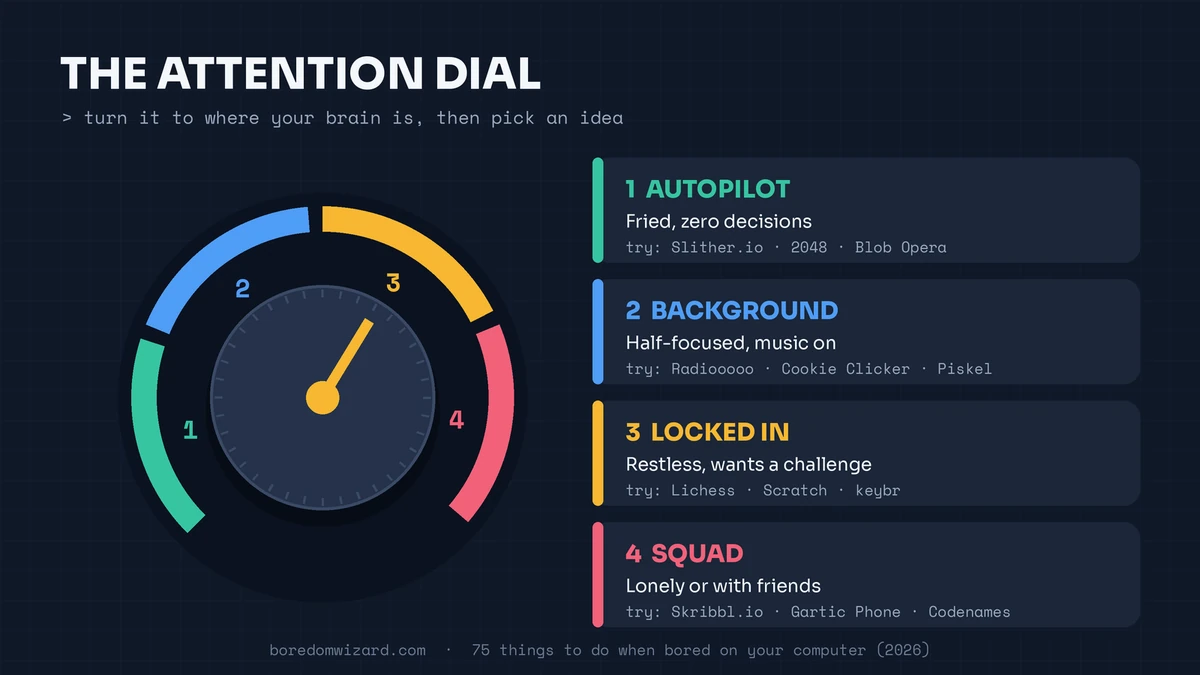
| Dial setting | How you feel | Try first |
|---|---|---|
| 1. Autopilot | Fried, low energy, want zero decisions | Slither.io, 2048, Blob Opera |
| 2. Background | Half-focused, maybe listening to something | Radiooooo, Cookie Clicker, pixel art |
| 3. Locked in | Restless brain that wants a challenge | Lichess puzzles, Scratch, keybr |
| 4. Squad | Lonely or with friends online | Skribbl.io, Gartic Phone, Codenames |
Each idea below ends with its dial setting and where it runs: Browser (nothing to install, usually fine on Chromebooks), Built in (already on Windows, Mac or Google), Download or Offline.
Free games to play on your computer when bored
If you’re wondering what to do on a PC when bored, start here. No credit card, no 40 GB download, and the browser ones load in seconds.
- 1. Slither.io: The multiplayer snake game that refuses to die. Eat glowing dots, grow huge, and try not to crash into anyone. Rounds last a few minutes. (Autopilot · Browser)
- 2. Wordle, Connections and Strands: The New York Times daily trio is free on the web. One round of each takes about 10 minutes, and the streaks keep you coming back. (Locked in · Browser)
- 3. Puzzle Streak on Lichess: Lichess is completely free with no ads. Puzzle Streak keeps feeding you chess puzzles until you miss one, and it gets harder fast. (Locked in · Browser)
- 4. OpenGuessr: Get dropped somewhere on Street View and guess where you are on the map. GeoGuessr limits free play, so OpenGuessr is the free way to scratch the same itch. (Locked in · Browser)
- 5. 2048: Slide numbered tiles until two matching ones merge. Getting to the 2048 tile takes longer than you think. (Autopilot · Browser)
- 6. Candy Box 2: An ASCII-art adventure that starts with a single candy counter and slowly unlocks a whole world. Leave it in a tab and check back. (Background · Browser)
- 7. A Dark Room: A text-only game that opens with a cold room and a fire you need to keep lit, then quietly grows into something much bigger. (Background · Browser)
- 8. Cookie Clicker: The original idle game, still updated. Click a cookie, buy grandmas, check back in an hour. (Background · Browser)
- 9. Epic Games Store’s free game: Epic gives away at least one PC game every week. Claim it and it’s yours to keep, even after the offer ends. (Locked in · Download)
- 10. Free-to-play PC games: Counter-Strike 2, Marvel Rivals, Dota 2 and Team Fortress 2 cost nothing on Steam. Fair warning: “one match” is never one match. (Locked in · Download)
- 11. Cloud gaming on an old laptop: GeForce NOW’s free tier and Xbox Cloud Gaming (with a Game Pass plan that includes it) stream big PC and console games through your browser, so an older laptop can run them. (Locked in · Browser)
- 12. Poki: A huge library of free browser games, from Subway Surfers to puzzle games, sorted by type and loading in seconds. (Autopilot · Browser)
- 13. Solitaire and Minesweeper: Windows ships with the Microsoft Solitaire Collection, and Google plays Solitaire, Minesweeper and Snake right in the search results. Just search the name. (Autopilot · Built in)
Want more? Our list of games to play when bored covers card games, word games and offline ones too.
Fun things to do on a computer: websites worth getting lost in

- 14. Radiooooo: Pick a country and a decade on the map and it plays the music people there were listening to. Try 1960s Brazil or 1980s Japan. (Background · Browser)
- 15. Visual essays on The Pudding: Data journalists explain pop culture with interactive charts, from the history of song lyrics to how people dress. Each one takes about 15 minutes. (Background · Browser)
- 16. Google Earth in 3D: Fly over your hometown, then over a city you’ve never seen. The 3D buildings in big cities are good enough to plan a trip. (Background · Browser)
- 17. NASA’s Eyes on the Solar System: Ride along with real spacecraft in 3D at eyes.nasa.gov, using their actual current positions. (Locked in · Browser)
- 18. Google Arts & Culture: Zoom into gigapixel paintings until you can see individual brushstrokes, or play its art puzzles and crosswords. (Background · Browser)
- 19. Live animal cams: Explore.org streams bears fishing in Alaska’s Katmai, eagles on their nests and puppies in a rescue center, all free and live. (Autopilot · Browser)
- 20. The Wiki Game: Race from one Wikipedia article to another using only the links inside the pages. Play solo or against strangers. (Locked in · Browser)
- 21. Reddit rabbit holes: r/todayilearned for facts, r/AskHistorians for answers that read like short books, r/dataisbeautiful for charts you didn’t know you needed. (Autopilot · Browser)
If you want the strange corners of the internet instead, we ranked the internet’s weird websites by how odd they get, and our websites to cure boredom list has more useful ones.
Creative things to do on your computer
Making something beats scrolling because you end up with a thing at the end. All of these are free.
- 22. Make a beat in BandLab: A free music studio that runs in your browser, with loops and virtual instruments. Aim for one 30-second track. (Locked in · Browser)
- 23. Conduct the Blob Opera: A Google Arts & Culture experiment: drag four singing blobs up and down and they harmonize like a real opera choir. (Autopilot · Browser)
- 24. Paint digitally in Krita: A free, professional painting program for Windows, Mac and Linux. Grab any photo as a reference and paint over it. (Locked in · Download)
- 25. Draw pixel art in Piskel: A free sprite editor. Animate a tiny 16×16 character and export it as a GIF. (Background · Browser)
- 26. Design a 3D object in Tinkercad: Autodesk’s free beginner 3D tool. Build a keychain or a tiny house by stacking shapes (you’ll need a free account). (Locked in · Browser)
- 27. Make a game in Scratch: MIT’s block-based coding site. Remix any project you like, change the rules, and you’ve made your first game. (Locked in · Browser)
- 28. Edit a video in Clipchamp: It comes with Windows 11. Turn your camera roll into a 60-second recap with music and captions. (Locked in · Built in)
- 29. Redesign your desktop: New wallpaper, a clean taskbar, folders that make sense. On Windows, Rainmeter adds custom clocks and widgets. (Background · Download)
- 30. Make a one-page zine in Canva: Pick a topic (your week, your favorite snacks, your cat) and lay it out like a tiny magazine. (Background · Browser)
- 31. Answer a writing prompt: r/WritingPrompts posts new ones every day. Set a 20-minute timer and write 300 words. (Locked in · Browser)
Learn something useful in an hour
- 32. Learn to touch type on keybr: keybr.com teaches you one new letter at a time until you can type without looking. Ten minutes a day works. (Locked in · Browser)
- 33. Learn 10 keyboard shortcuts: Start with Win+V (clipboard history), Win+Shift+S (screenshot), Ctrl+Shift+T (reopen a closed tab) and Win+. (emoji). On a Mac, Cmd+Shift+4 grabs part of the screen. (Locked in · Built in)
- 34. Do a Duolingo lesson: One lesson takes about five minutes. Do three and you’ve learned enough to order a coffee. (Background · Browser)
- 35. Take a Khan Academy course: Free lessons on everything from algebra to art history, with practice questions that tell you exactly what you got wrong. (Locked in · Browser)
- 36. Build a web page with freeCodeCamp: The free Responsive Web Design course has you writing real HTML and CSS within minutes. (Locked in · Browser)
- 37. Make the Blender donut: Blender is free, and Blender Guru’s beginner donut series is a rite of passage for anyone curious about 3D. (Locked in · Download)
- 38. Learn to draw with Drawabox: Free, structured drawing lessons that start with lines and boxes and build up to real drawings. (Locked in · Browser)
- 39. Master a map on Seterra: Name every US state, or every country in Africa, against the clock. Your geography will never be this good again. (Locked in · Browser)
- 40. Ask an AI to quiz you: Paste your notes into ChatGPT, Gemini or Claude and ask for 10 tricky questions. It’s the fastest study session you’ll ever do. (Locked in · Browser)
- 41. Watch one great lecture: Pick a single lecture from MIT OpenCourseWare or a TED-Ed lesson and take notes like it’s a real class. (Background · Browser)
Things to do on your laptop when bored
A laptop has a battery, a keyboard full of crumbs and a Downloads folder you haven’t opened in a year. So when you’re stuck on what to do on a laptop when bored, try the laptop-only jobs below. They feel weirdly satisfying, and most take under 15 minutes.
- 42. Check your battery health: Windows can generate a full battery report with one command, and Macs show it in Settings. Steps are in the how-to below. (Locked in · Built in)
- 43. Clean the keyboard and screen: Shut it down, tip it upside down, use compressed air at an angle, then wipe the screen with a dry microfiber cloth. (Autopilot · Offline)
- 44. Empty your Downloads folder: Sort by size and delete old installers and duplicate files. It’s often several gigabytes. (Autopilot · Built in)
- 45. Free up storage: Storage Sense on Windows (Settings, System, Storage) and Storage on a Mac (System Settings, General) show you exactly what is eating your space. (Background · Built in)
- 46. Back up your photos: Copy your photo folders to an external drive or a cloud account. If your laptop died tomorrow, they would still exist. (Background · Built in)
- 47. Do a 15-minute security tune-up: Install a password manager, change any password you’ve reused, and turn on two-step verification for your email account first. (Locked in · Browser)
- 48. Set up virtual desktops: Press Win+Ctrl+D on Windows or use Mission Control on a Mac. Keep one desktop for work or school and one for fun. (Background · Built in)
- 49. Play the offline dino game: Type chrome://dino in Chrome and the T-Rex runner starts, Wi-Fi or not. It’s perfect for planes and dead zones. (Autopilot · Offline)
- 50. Turn your laptop into a couch cinema: Plug it into the TV with an HDMI cable, dim the lights, and watch something you’ve been saving. (Autopilot · Built in)
- 51. Clean up your browser bookmarks: Delete dead links, then make three folders: read later, tools, fun. Future you will find things in seconds. (Autopilot · Built in)

Generate a battery report on a Windows laptop in about three minutes, or find Battery Health on a Mac.
Total Time: 3 minutes
Open Command Prompt
Click Start, type cmd and press Enter. You don’t need administrator rights.
Run the battery report
Type powercfg /batteryreport and press Enter. Windows saves a file called battery-report.html.
Open the report
Windows shows where it saved the file, usually your user folder. Open it in any web browser.
Compare the two capacity numbers
Find Design Capacity and Full Charge Capacity. If the full charge number is much lower than the design number, the battery has worn down and won’t last as long.
On a Mac, open Battery settings
Go to System Settings, then Battery, and click the info button next to Battery Health to see its condition and maximum capacity.
Things to do on a school computer when bored
School laptops and Chromebooks block a lot, so everything here runs in a browser with no downloads. Stick to sites your school allows; trying to get around the filter is a fast way to lose the laptop. If you’re stuck in class, our guide to things to do when bored in class has screen-free ideas too.
- 52. Try Google easter eggs: Search do a barrel roll, askew or dvd screensaver and watch the page react. We keep a tested list of Google easter eggs that still work. (Autopilot · Browser)
- 53. Play Interland: Google’s free online safety game, part of Be Internet Awesome. Schools usually allow it, and the four islands are genuinely fun. (Autopilot · Browser)
- 54. Level up on TypingClub: Many schools already use it, so it’s usually unblocked. Work through lessons and collect stars. (Locked in · Browser)
- 55. Play old Google Doodle games: The Doodle archive at google.com/doodles keeps playable ones, like the Champion Island sports game and Coding for Carrots. (Background · Browser)
- 56. Do an Hour of Code activity: Code.org’s short coding games use characters from Minecraft and Star Wars, and they count as learning. (Locked in · Browser)
- 57. Make a choose-your-own-adventure in Google Slides: Write a story where each slide ends with two choices, then link each choice to a different slide. (Locked in · Built in)
- 58. Play Run 3 on Coolmath Games: The school-computer classic still works. Fireboy and Watergirl is better with a friend sitting next to you. (Autopilot · Browser)
- 59. Play a Blooket set: Pick a public set on whatever you’re studying. It’s a game, but it’s also technically revision. (Locked in · Browser)
- 60. Use Google’s hidden tools: Search timer, metronome, spinner or breathing exercise and Google gives you a working tool. There are 50 more in our tested list of Google tricks. (Background · Built in)
- 61. Get ahead on homework: The honest one. Ten minutes on tomorrow’s reading now means a free evening later. (Locked in · Built in)

More school-day ideas live in our guide to things to do when bored at school.
Things to do online with friends
- 62. Skribbl.io: One person draws, everyone else guesses. Make a private room and send the link. (Squad · Browser)
- 63. Gartic Phone: The telephone game with drawings. By round three, “a dog on a skateboard” has turned into something unrecognizable. (Squad · Browser)
- 64. Codenames online: The official free version at codenames.game. Split into two teams and give one-word clues. (Squad · Browser)
- 65. Board Game Arena: Hundreds of real board games, many free to play, with the rules handled for you. (Squad · Browser)
- 66. Host a watch party: Share your screen on Discord, or use Teleparty to sync Netflix so everyone presses play at the same time. (Squad · Browser)
- 67. Build something together in Minecraft: Start a shared world and give yourselves one goal for the night: a castle, a farm or a roller coaster. (Squad · Download)
- 68. Make a tier list together on TierMaker: Pick a topic (snacks, movies, each other’s worst habits), share your screen and argue about every single ranking. (Squad · Browser)
- 69. Write a story together in Google Docs: Everyone adds one sentence at a time. It never ends the way anyone planned. (Squad · Built in)

What to do on your computer at night
Late at night you want something that winds you down, not something that keeps you up. Turn on Night Light (Windows) or Night Shift (Mac) first.
- 70. Put on a lofi stream: The lofi hip hop radio stream from Lofi Girl on YouTube has been running for years. Pair it with something slow. (Background · Browser)
- 71. Put on Rainy Mood: Rain and distant thunder that loops forever. Add your own music on top. (Autopilot · Browser)
- 72. Borrow an ebook with Libby: If you have a library card, Libby lends ebooks and audiobooks for free. (Background · Browser)
- 73. Write a three-line journal: What happened today, one thing you’re grateful for, and the one thing that matters tomorrow. Close the laptop after. (Background · Built in)
- 74. Plan a dream trip in Google Maps: Save pins for food, views and things to do in one city. One day you might actually go. (Background · Browser)
- 75. Watch a calm documentary: Nature and space documentaries are ideal. Pick one before bed and set a sleep timer if your app has one. (Autopilot · Browser)

When the computer is the problem
Sometimes the boredom is your brain asking for a break from the screen. The American Academy of Ophthalmology recommends the 20-20-20 rule: every 20 minutes, look at something about 20 feet away for 20 seconds. If you’ve been on the computer for hours and nothing above sounds good, close the lid and pick something from our list of 120 fun things to do when you’re bored instead.
If you are bored on the computer with a partner or a long distance friend, try these online games for couples.
Bored at your desk? Fly to these scary things on Google Earth with coordinates.
If Minecraft is open but you have no plan, roll a project from our Minecraft build ideas list.
Things to do when bored on computer: FAQ
What should I do when bored on my computer?
Play a free browser game like Wordle, Lichess puzzles or Slither.io, explore a website like Google Earth or Radiooooo, make something in BandLab, Piskel or Scratch, learn a skill on keybr or Duolingo, tidy up your laptop, or play Skribbl.io or Gartic Phone with friends. Pick by how much attention you have: easy ideas when you’re tired, challenges when you’re restless.
What are fun things to do on a laptop?
Fun things to do on a laptop include playing free browser games, making music in BandLab, painting in Krita, exploring Google Earth or Radiooooo, playing online with friends, and laptop-only jobs like checking your battery health, cleaning the keyboard and clearing out the Downloads folder.
What can I do on a school computer when I’m bored?
Stick to browser activities your school allows: Google easter eggs like do a barrel roll, Interland, TypingClub, Code.org’s Hour of Code, Google Doodle games, Coolmath Games, Blooket, or making a choose-your-own-adventure story in Google Slides. Don’t try to get around the school’s filter.
What are good free games to play on a computer?
Good free computer games include Wordle and Connections, Lichess, Slither.io, 2048, Candy Box 2, A Dark Room and Cookie Clicker in a browser, plus Counter-Strike 2, Marvel Rivals and Dota 2 on Steam and the free game Epic gives away every week.
What can I do on my computer without internet?
Play the Chrome dino game (chrome://dino), Microsoft Solitaire, clean up your files and Downloads folder, back up photos to an external drive, write or journal in a document, draw, or watch something you downloaded earlier.
How do I check my laptop’s battery health?
On Windows, open Command Prompt, type powercfg /batteryreport and open the battery-report.html file it creates, then compare Design Capacity with Full Charge Capacity. On a Mac, go to System Settings, Battery, and check Battery Health.
What should I do on my computer at night when I can’t sleep?
Choose calm things: a lofi stream, Rainy Mood, an ebook from Libby, a short journal entry or a slow documentary. Turn on Night Light or Night Shift, and if you’re still awake after 20 to 30 minutes, close the laptop.
Your next 10 minutes
Turn the dial, pick one idea, and give it a full 10 minutes before you judge it. Most boredom on a computer comes from opening five things and committing to none of them.
Bored somewhere else? Try things to do on your phone when bored or things to do when bored at work.
Dreaming of travel? Explore 100+ famous landmarks around the world, sorted by country and US state, with what is new in 2026.