20 productive and fun Things to Do When Bored at Work
Work boredom is a specific kind of boredom. It is not the same as being bored at home where you can build a blanket fort or dance in your room. At work, you are bored inside a container of expectations: your boss can see your screen, your coworkers can hear you, and the line between “killing time” and “looking lazy” is thin enough to trip over. So the usual boredom advice — go for a walk, read a book, start a hobby — does not translate. You need things that are interesting enough to cure boredom and professional enough to survive a glance from your manager.
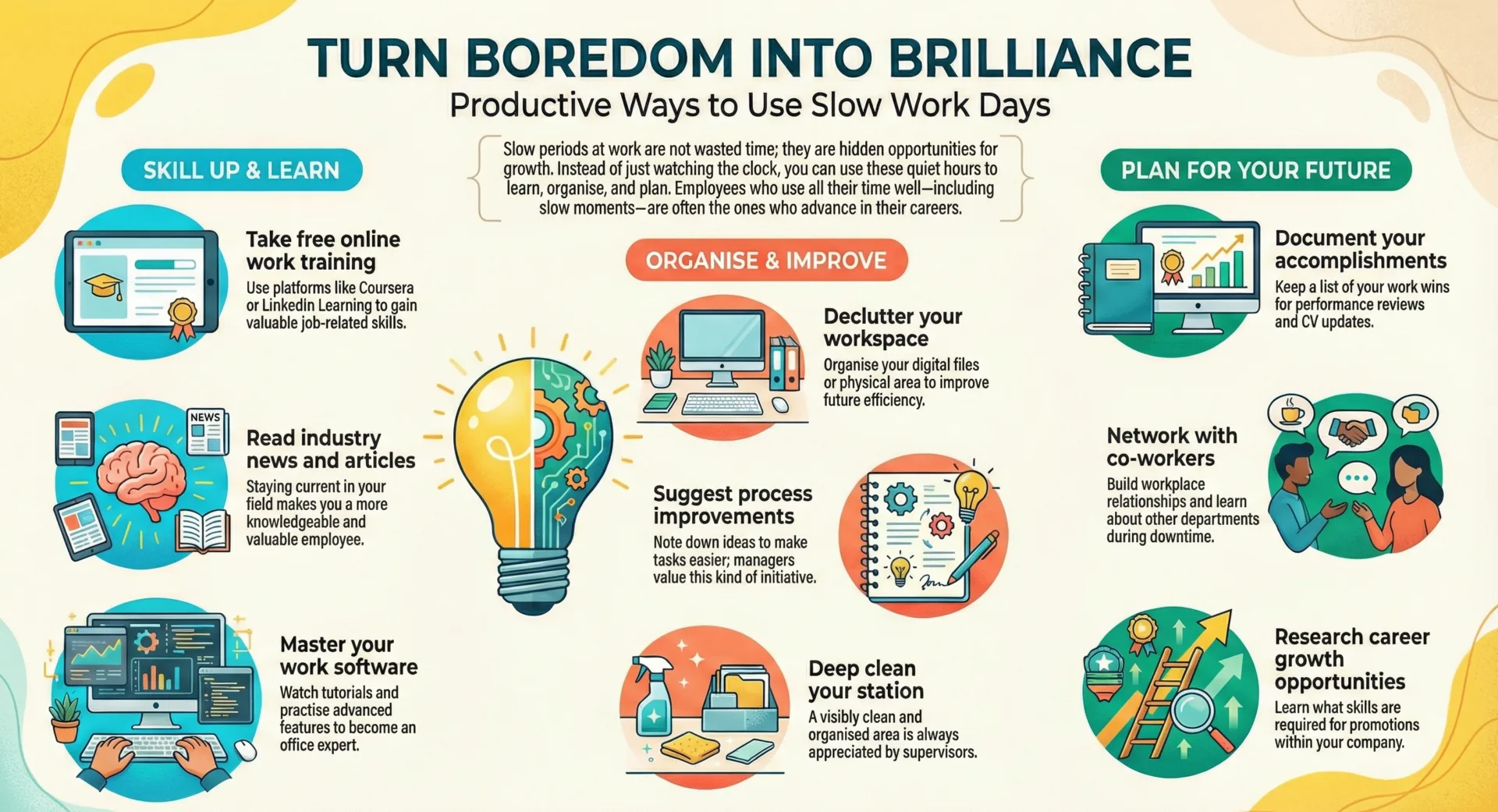
The 20 best things to do when bored at work include mapping process inefficiencies in your team’s workflow, designing a personal Kanban board on Trello, auditing old email templates nobody has updated in 2 years, drafting gratitude emails to coworkers who helped you recently, creating cheat sheets for tasks you do weekly, testing keyboard shortcuts until you are faster than anyone in your office, writing process documentation that does not exist yet, reorganizing your cloud folders, building a skill-building sprint plan for the next 30 days, and 11 more ideas that look productive because most of them genuinely are.
This list is not “play Sudoku and hope nobody notices.” Leo Babauta at Zen Habits wrote a version of that list years ago and it still circulates. It had its moment. But in 2026, with screen-sharing on Slack calls, open office plans, and activity-tracking software on remote setups, you need a smarter approach. These 20 things to do when bored at work are designed to cure boredom and build your career at the same time — so that even if someone catches you, you look like the most engaged person in the office.
The Work Boredom Matrix — 4 Types, 4 Strategies
Work boredom falls into 4 categories, and identifying which one you are in right now determines which activity from this list will actually help.
| Boredom Type | What It Feels Like | What Fixes It | Activities |
| Waiting Boredom | Between tasks. Inbox empty. Nothing assigned. You are available but unused. | Proactive tasks that look like initiative: process improvements, documentation, skill-building. | 1–5 |
| Monotony Boredom | Doing the same repetitive task. Brain is on autopilot. Clock moves slowly. | Mental stimulation that runs parallel to your work: learning, challenges, micro-goals. | 6–10 |
| Disengagement Boredom | The work itself feels pointless. Motivation is low. You are doing the minimum. | Reconnection activities: gratitude, relationship-building, career planning, perspective shifts. | 11–15 |
| Trapped Boredom | You cannot leave. Meeting is dead. Afternoon is empty. You are physically stuck at your desk. | Stealthy entertainment and micro-projects that look professional on screen. | 16–20 |
Identify your type. Skip to that section. One well-matched activity is worth more than 20 random ones. If you are not sure, start with Waiting Boredom — those activities are the safest because they genuinely add value regardless of your role.
When You Have Nothing Assigned and the Inbox Is Empty (Activities 1–5)
1. Map Process Inefficiencies in Your Team’s Workflow
Spending 20 minutes identifying 3 to 5 bottlenecks or redundant steps in your team’s daily workflow turns dead time into the kind of initiative that gets noticed in performance reviews.
Open a blank document or a note in Trello. Write down the 5 most common processes your team runs: onboarding a client, handling a support ticket, shipping a feature, running a report, approving a request. Now walk through each one mentally and ask: where does it slow down? Where do people wait? Where does the same information get entered twice? Map process inefficiencies by writing a short description of each bottleneck and one idea for fixing it.
You are not proposing a company-wide overhaul. You are documenting observations. The document itself is valuable whether you share it or not — it sharpens your systems thinking and gives you material for your next one-on-one with your manager. Sketch workflow improvements on paper if you prefer analog, or build a simple flowchart in Google Docs. Either way, this is one of the most productive things to do when bored at work because the output is real.
| Detail | Info |
| Time Required | 15–30 minutes |
| Cost | Free |
| Energy Level | Low |
| Best For | Office workers, remote workers, desk jobs, any role with processes |
| Stealth Rating | High — looks like deep work |
2. Write Process Documentation That Does Not Exist Yet
Creating a step-by-step guide for a task your team does regularly but has never documented takes 20 minutes and becomes a permanent resource that outlasts your boredom.
Pick a task that you know how to do but that has no written guide. The thing that new hires always ask about. The process that lives in one person’s head. Open a document. Write the steps. Add screenshots if relevant. Save it in a shared folder. Write process documentation that is clear enough that someone who has never done the task could follow it without asking you a single question.
This works because it is genuinely useful to your team and it looks like initiative to anyone watching. Your manager sees a shared document with your name on it. Your coworkers see a resource that saves them time. And you spent 20 minutes of dead time building something permanent instead of scrolling Reddit. If documenting work processes sparks your interest in organizing systems more broadly, our guide on things to do when bored working from home covers more productivity-focused remote work activities.
| Detail | Info |
| Time Required | 15–30 minutes |
| Cost | Free |
| Energy Level | Low |
| Best For | Any role with repeatable tasks |
| Stealth Rating | Very High — this IS productive work |
3. Audit Old Email Templates Nobody Has Updated Since 2023
Reviewing and refreshing the email templates your team uses — outreach emails, follow-ups, onboarding emails, auto-replies — takes 20 minutes and improves communication your team sends daily.
Open your team’s shared templates folder, CRM templates, or saved email responses. Read each one as if you were receiving it for the first time. Is the tone right? Is the information current? Are there links that go to dead pages? Audit old email templates by flagging outdated language, broken links, and formatting that does not match your current brand. Rewrite the worst one. Share the updated version with your team.
Most teams have templates that were written 2 to 3 years ago and have not been touched since. Finding and fixing one of them during a slow afternoon is the kind of quiet improvement that compounds over hundreds of emails sent per month.
| Detail | Info |
| Time Required | 15–25 minutes |
| Cost | Free |
| Energy Level | Low |
| Best For | Anyone with email templates: sales, support, HR, marketing |
| Stealth Rating | Very High — looks like quality assurance |
4. Build a Personal Kanban Board for Your Week
Setting up a Kanban board on Trello, Notion, or a piece of paper with 3 columns — To Do, Doing, Done — takes 10 minutes and gives your work week a visual structure that reduces future boredom.
Open Trello or draw 3 columns on paper. Label them: To Do, In Progress, Done. List every task you have this week. Move each one into the right column. Design a personal Kanban board that includes not just assigned tasks but also self-initiated projects, learning goals, and follow-ups you have been postponing. The act of building the board is itself an anti-boredom activity, and the board prevents future boredom by making your next action visible at all times.
Kanban boards work against work boredom because they eliminate the “I have nothing to do” problem permanently. The board always shows what is next. Once it is built, you never need to wonder what to do during slow moments — the answer is on the board.
| Detail | Info |
| Time Required | 10–15 minutes to build, ongoing use |
| Cost | Free (Trello, Notion, paper) |
| Energy Level | Low |
| Best For | Any role, especially desk jobs and remote workers |
| Stealth Rating | Very High — this IS project management |
5. Create Cheat Sheets for Tasks You Do Weekly
Writing a one-page cheat sheet for a task you perform every week — keyboard shortcuts, step sequences, common fixes — saves you time going forward and looks like professional development to anyone watching.
Pick the task you do most often. Write down every shortcut, every step, every decision point. Format it as a single-page reference you can print or pin to your monitor. Create cheat sheets for recurring reports, software workflows, client communication templates, or data entry processes. Test keyboard shortcuts you have never used for your most-used software and add the fastest ones to the sheet.
Cheat sheets are one of those productivity tools that everyone agrees are useful and nobody bothers to make. Building one during a slow hour at work means you are investing boredom time into future speed. If you enjoy building personal systems, our guide on how to build a dopamine menu when bored covers the neuroscience of creating your own activity frameworks.
| Detail | Info |
| Time Required | 15–25 minutes per sheet |
| Cost | Free |
| Energy Level | Low |
| Best For | Any role with repetitive tasks |
| Stealth Rating | Very High — looks like optimization |
When the Work Is Repetitive and Your Brain Is on Autopilot (Activities 6–10)
6. Learn One New Keyboard Shortcut Every Slow Hour
Memorizing one keyboard shortcut per slow period — and practicing it 10 times until it is muscle memory — compounds into genuine speed gains within a week.
Google “keyboard shortcuts for [your most-used software].” Pick one you have never used. Practice it 10 times right now. Tomorrow, pick another. In a month, you will be noticeably faster than your coworkers at the same tasks. Test keyboard shortcuts for Excel, Google Sheets, Slack, Microsoft Teams, your CRM, your email client, your browser. The gap between someone who uses shortcuts and someone who clicks through menus is 15 to 30 minutes per day — and that gap is built during exactly these boring moments.
| Detail | Info |
| Time Required | 2–5 minutes per shortcut |
| Cost | Free |
| Energy Level | Low |
| Best For | Desk job workers, computer-heavy roles |
| Stealth Rating | Perfect — you are literally using your keyboard |
7. Listen to a Podcast Episode With One Earbud In
Playing a single podcast episode on a topic that interests you — business, psychology, technology, true crime — with one earbud in while doing repetitive work makes monotonous tasks feel 50% shorter.
Pick a podcast on Spotify, Apple Podcasts, or YouTube. Play one episode. Keep one earbud in and the volume low enough to hear if someone speaks to you. The podcast provides mental stimulation that runs parallel to the repetitive task your hands are doing. Your hands stay productive. Your brain stops being bored. One earbud keeps you reachable.
The key is choosing content that engages without distracting. Narrative podcasts (storytelling, investigations, interviews) work better than dense instructional ones during repetitive work. If you want structured listening recommendations, our guide on books to read when bored includes audiobook and podcast suggestions organized by topic and mood.
| Detail | Info |
| Time Required | 20–60 minutes per episode |
| Cost | Free |
| Energy Level | Low |
| Best For | Repetitive desk work, data entry, filing, any role with downtime |
| Stealth Rating | High — one earbud is widely accepted |
8. Plan a 30-Day Skill-Building Sprint for One Professional Skill
Spending 15 minutes designing a personal 30-day learning plan for one skill — writing, coding, design, public speaking, data analysis — turns boredom into career development.
Pick one skill you want to sharpen. Open a document. Write 30 daily micro-tasks: Day 1 — read one article about the skill. Day 2 — watch a 10-minute YouTube tutorial. Day 3 — practice for 15 minutes. Day 4 — review what you learned. Plan skill-building sprints that fit inside your work breaks: each task takes 10 to 20 minutes and can be done during downtime. Whether it is computer programming, writing, Adobe InDesign, or data visualization, the sprint turns idle minutes into compounding professional growth.
Improve your skills systematically instead of randomly. A 30-day plan with daily micro-goals means you never face the question “what should I learn today?” again. The plan answers it for you. If you are a college student in an entry-level role, our guide on things to do when bored for college students has career-building activities designed for early-career professionals.
| Detail | Info |
| Time Required | 15 minutes to plan, 10–20 min daily |
| Cost | Free |
| Energy Level | Low to Medium |
| Best For | Any role, especially early-career professionals |
| Stealth Rating | High — looks like professional development |
9. Reorganize Your Cloud Folders Into a System That Actually Works
Spending 20 minutes reorganizing your Google Drive, OneDrive, or Dropbox into a logical folder structure eliminates the daily friction of searching for files and looks like peak organization.
Open your cloud storage. Look at the top level. If it is a mess of unsorted files, undated folders, and documents named “final_v3_REAL_final,” spend 20 minutes creating a folder structure that makes sense: by project, by client, by date, by department. Reorganize cloud folders by moving the 20 most recently used files into the right homes. Delete duplicates. Archive anything older than 12 months that you have not opened.
This is one of those tasks that everyone knows they should do and nobody does until they are bored enough. The boredom is the trigger. Use it. A clean file system saves you 5 to 10 minutes per day in search time, which is 25 to 50 minutes per week. The return on 20 minutes of boredom is months of faster file access.
| Detail | Info |
| Time Required | 15–30 minutes |
| Cost | Free |
| Energy Level | Low |
| Best For | Any role that uses cloud storage |
| Stealth Rating | Very High — this IS digital organization |
10. Calculate Your Actual Productivity Metrics for the Past Month
Spending 15 minutes calculating how much work you actually produced last month — tickets closed, emails sent, projects completed, revenue generated — gives you data for your next raise conversation.
Open your task tracker, CRM, email sent folder, or project management tool. Count the outputs: How many tasks did you complete? How many client calls did you take? How many reports did you deliver? Calculate productivity metrics that are specific and quantified. Write them in a document titled “Monthly Output Summary.” Update it every month.
This is one of the most productive things to do when bored at work because the output is directly useful in performance reviews, salary negotiations, and resume updates. Most employees cannot quantify their contributions when asked. You can, because you spent a boring afternoon counting. If career planning interests you during slow work hours, our guide on things to do when bored for adults has a full section on professional development projects.
| Detail | Info |
| Time Required | 10–20 minutes |
| Cost | Free |
| Energy Level | Low |
| Best For | Any salaried or tracked role |
| Stealth Rating | Very High — this is self-assessment |
Natty’s take:
I coach executives who tell me they are bored at work, and the first question I ask is: are you bored because there is nothing to do, or because nothing you are doing feels meaningful? The answer changes the strategy entirely. If you are between tasks, build something useful from activities 1 through 5. If the work itself feels empty, the problem is bigger than a cheat sheet can fix — and activities 11 through 15 address that directly.
When the Work Feels Pointless and Motivation Is Low (Activities 11–15)
11. Draft a Gratitude Email to a Coworker Who Helped You Recently
Writing a 3-sentence email thanking a coworker for something specific they did for you takes 5 minutes and improves your mood, your relationship with that person, and your reputation in the office simultaneously.
Think of someone who helped you in the past 2 weeks: covered your shift, answered a question, caught a mistake, shared a resource. Open a new email. Write 3 sentences: what they did, why it mattered, and a genuine thank you. Send it. Draft gratitude emails during slow moments and you build a network of positive relationships one message at a time.
Gratitude emails work against disengagement boredom because they shift your attention from what is wrong with your work to what is right with the people around you. The email takes 5 minutes. The relationship benefit lasts months. Norman Mailer once said boredom slays more of existence than war — a gratitude email is a small act of construction in the middle of that emptiness.
| Detail | Info |
| Time Required | 3–5 minutes |
| Cost | Free |
| Energy Level | Low |
| Best For | Any role, any workplace |
| Stealth Rating | Perfect — this looks like professional communication |
12. Update Your Resume Even Though You Are Not Job Hunting
Spending 15 minutes adding your most recent accomplishments to your resume when you are not under pressure produces a better document than panic-editing it the night before an application.
Open your resume. Add the 3 most significant things you have done in the past 6 months. Update your skills section. Rewrite your summary if it sounds like it was written by a different person — because it probably was. The low-pressure context of “I am bored at work” is the best headspace for resume work: you are not anxious, not desperate, and not filtering through urgency.
Leo Babauta listed “pursue your next job” as a boredom cure on Zen Habits, and he was right — but you do not need to be actively job hunting to benefit from keeping your resume current. An updated resume is insurance. Build it when you are bored and it is ready when you need it. If you are considering a career shift, our guide on things to do when bored after retirement covers life-transition planning that applies to any career stage, not just post-retirement.
| Detail | Info |
| Time Required | 10–20 minutes |
| Cost | Free |
| Energy Level | Low |
| Best For | Any employed person |
| Stealth Rating | Medium — do this in a private document |
13. List 10 Life Goals That Have Nothing to Do With Your Job
Writing 10 personal goals that exist completely outside your professional life takes 10 minutes and reminds your brain that you are more than your job title — which is often the root cause of work boredom.
Open a private note on your phone or a document your employer cannot access. Write 10 things you want to do, experience, or become that have nothing to do with work. Run a marathon. Learn Italian on Duolingo. Visit 5 countries. Write a novel. Cook 50 recipes from 50 countries. Build a piece of furniture. Volunteer somewhere. List life goals that make you feel like a whole person, not just an employee.
This works against disengagement boredom because it reintroduces a sense of purpose that the job may have drained. You are not bored because you have nothing to do. You are bored because everything you are doing serves someone else’s goals. Writing your own goals — even for 10 minutes — reconnects you to your own direction. If the goal-setting sparks deeper reflection, our guide on things to do when bored and anxious covers the overlap between workplace restlessness and underlying worry.
| Detail | Info |
| Time Required | 10 minutes |
| Cost | Free |
| Energy Level | Low |
| Best For | Any role, any career stage |
| Stealth Rating | High — looks like note-taking on your phone |
14. Research One Career Move You Have Been Curious About
Spending 20 minutes researching one career path, role, or industry you have been quietly curious about gives your boredom a productive outlet and might change your professional direction.
Open LinkedIn. Search for the job title you have been curious about. Read 5 profiles of people who have that role. Look at their career paths. What did they study? Where did they work before? What skills do they list? Then search Google for “how to become a [that role].” Read one article. You are not committing to anything. You are exploring. And the exploration itself shifts your relationship with the work boredom — it stops feeling like a dead end and starts feeling like a corridor.
Career research during work boredom is how most major career transitions actually begin. Not with a dramatic decision, but with a quiet Google search during a slow Tuesday afternoon. If you want to take the exploration further, our guide on things to do when bored on your phone has LinkedIn-based networking and career research activities designed for mobile.
| Detail | Info |
| Time Required | 15–25 minutes |
| Cost | Free |
| Energy Level | Low |
| Best For | Any role, especially those feeling stuck |
| Stealth Rating | Medium — use a private browser window |
15. Draft Meeting Icebreakers for the Next Team Meeting You Run
Writing 5 good icebreaker questions for your next meeting takes 5 minutes during a slow afternoon and makes you the person who starts every meeting with something interesting instead of awkward silence.
Open a note. Write 5 questions that are interesting but work-appropriate: “What is one skill you learned outside of work this year?” “If you could automate one part of your job, what would it be?” “What is the best professional advice you have ever received?” Draft meeting icebreakers that reveal something real about people without crossing into personal territory.
Icebreakers are one of those things everyone dreads but nobody bothers to prepare properly. Having 5 good ones ready means you run better meetings, and the preparation took less time than one scroll through Instagram. If improving meetings and team communication is interesting to you, our guide on things to do when bored with friends has more structured group activity ideas that translate to professional contexts.
| Detail | Info |
| Time Required | 5–10 minutes |
| Cost | Free |
| Energy Level | Low |
| Best For | Anyone who runs or attends meetings |
| Stealth Rating | Perfect — this IS meeting preparation |
When You Are Physically Stuck at Your Desk and Cannot Leave (Activities 16–20)
These activities are for the moments when you cannot get up, cannot switch tasks, and cannot do anything that looks obviously non-work. A dead meeting. An empty afternoon at a desk job. A slow shift where leaving is not an option. These 5 are stealthy, screen-safe, and look professional at a glance. If you are dealing with the specific frustration of desk-bound boredom day after day, our guide on things to do when bored on computer has more screen-based activities designed for exactly this kind of trapped downtime.
16. Play the Wikipedia Rabbit Hole Game With a 5-Click Rule
Starting on any Wikipedia page and clicking internal links until you reach a completely unrelated topic in exactly 5 clicks turns idle browsing into a structured mental challenge.
Open Wikipedia. Go to a random article (there is a “Random article” button in the sidebar). Read the first paragraph. Click one internal link. Read that article’s first paragraph. Click again. Repeat until you have clicked 5 times. Where did you end up? The game is seeing how far from the starting topic you travel in exactly 5 clicks. Try to predict where you will land. Try to reach a specific target article in 5 clicks.
This is genuinely educational — Leo Babauta called it “edumacation” and recommended Wikipedia as a starting point for self-directed learning. The 5-click rule adds structure to what would otherwise be aimless browsing. On your screen it looks like research. In your brain it feels like an adventure. Educate yourself one rabbit hole at a time.
| Detail | Info |
| Time Required | 10–20 minutes |
| Cost | Free |
| Energy Level | Low |
| Best For | Any desk job, computer-based role |
| Stealth Rating | High — looks like research on your screen |
17. Optimize Your Browser Bookmarks Into a Real System
Sorting your browser bookmarks into organized folders takes 10 minutes, eliminates digital clutter, and gives you a personal reference library you can access instantly.
Open your bookmark bar. If it is a chaotic string of unsorted links accumulated over months, spend 10 minutes creating folders: Work Tools, Learning Resources, Articles to Read, Personal, Industry News. Sort every bookmark. Delete dead links. Optimize browser bookmarks until the bar looks like a table of contents instead of a junk drawer.
This is one of those tasks that is small enough to do in a boring 10-minute window and useful enough to make every future browsing session faster. Your browser is a tool you use 8 hours a day. Organizing it is the digital equivalent of decluttering your workspace — and it takes a fraction of the time.
| Detail | Info |
| Time Required | 10–15 minutes |
| Cost | Free |
| Energy Level | Low |
| Best For | Any computer-based role |
| Stealth Rating | Perfect — you are using your browser normally |
18. Inventory Your Digital Clutter — Desktop, Downloads, Tabs
Spending 10 minutes cleaning your computer desktop, clearing your downloads folder, and closing tabs you opened 3 days ago produces an immediate visual clean-up that reduces mental noise.
Right now, look at your computer desktop. Count the files. If there are more than 10 unsorted items, spend 10 minutes filing or deleting them. Then open your Downloads folder and delete everything older than 30 days. Then look at your browser tabs: close everything you are not actively using. Inventory digital clutter as a 10-minute speed challenge — set a timer and see how clean you can make your digital workspace before it rings.
A clean desktop is the workspace equivalent of a clean desk. Your brain registers visual clutter as unfinished business, even if the files are irrelevant. Clearing them removes that background noise. Leo Babauta wrote about decluttering his physical workspace until his desk held nothing but his iMac — the digital version of that discipline starts here.
| Detail | Info |
| Time Required | 10 minutes |
| Cost | Free |
| Energy Level | Low |
| Best For | Any computer-based role |
| Stealth Rating | Perfect — you are organizing your work computer |
19. Play the Desk Exercise Challenge — One Move Per Hour
Doing one discreet exercise per hour at your desk — 10 squats by your chair, 15 calf raises under your desk, 20 seated leg lifts — breaks physical monotony without drawing attention.
Set a silent hourly reminder on your phone. Each hour, do one move: 10 squats next to your chair (stand up, sit down, repeat), 15 calf raises under your desk, 20 seated leg lifts, 10 desk pushups against the edge, or 30-second butt squeezes that nobody can see. The micro-dose of physical activity breaks the sedentary pattern that makes work boredom feel physical, not just mental.
Dehydration makes desk boredom worse — drink some water every time you do a desk exercise. The water keeps your brain sharp and the exercise keeps your body from stagnating. Together they address the two physical causes of workplace boredom that most people ignore. If you want a full exercise library for desk-bound people, our guide on exercises to do when bored has 37 options including desk-specific routines.
| Detail | Info |
| Time Required | 1–2 minutes per hour |
| Cost | Free |
| Energy Level | Low |
| Best For | Desk workers, office jobs, remote workers |
| Stealth Rating | Very High — looks like stretching |
20. Write a “What I Actually Did Today” Log Before You Leave
Spending 5 minutes at the end of each workday listing everything you accomplished — including small things — counteracts the “I did nothing today” feeling that work boredom creates and builds a record you can reference in performance reviews.
Before you close your laptop or leave your desk, open a running document. Write today’s date. List everything you did: responded to 12 emails, attended 2 meetings, filed a report, helped a coworker with a question, organized 3 cloud folders, drafted a process document. The log reframes your day from “boring” to “productive in ways I was not tracking.” Over a month, the log becomes a performance record. Over a year, it becomes a resume-building database.
This takes 5 minutes and produces the single most useful career document most employees never create. Your manager asks “what have you been working on?” and you open the log. Your annual review asks for accomplishments and you have 12 months of daily records. The boredom that prompted you to start this habit ends up being the most productive boredom of your career. For more reflective journaling practices, our guide on things to do when bored alone has writing-based solo activities that translate to both personal and professional contexts.
| Detail | Info |
| Time Required | 5 minutes per day |
| Cost | Free |
| Energy Level | Low |
| Best For | Any role |
| Stealth Rating | Perfect — this IS work documentation |
Natty’s take: Here is what I have learned coaching teams: the people who get the most out of their careers are not the ones who are never bored at work. They are the ones who use the boring moments strategically. A slow afternoon is not wasted time. It is unassigned time. And unassigned time, used well, builds the career that assigned time never gives you space for. Pick one activity from this list every slow day. In 6 months, you will have built more than the person who scrolled through every boring hour.
Best Things to Do When Bored at Work — By Situation
| Your Situation | Best Activities | Time | Stealth |
| Between tasks, nothing assigned | Map Processes, Write Documentation, Audit Templates, Kanban Board, Cheat Sheets | 10–30 min | Very High |
| Repetitive task, brain on autopilot | Keyboard Shortcuts, Podcast, Skill Sprint, Organize Cloud, Productivity Metrics | 5–30 min | High |
| Feeling disengaged and unmotivated | Gratitude Email, Resume Update, Life Goals, Career Research, Icebreakers | 5–25 min | Medium–High |
| Stuck at desk, cannot leave | Wikipedia Game, Bookmarks, Digital Declutter, Desk Exercises, Daily Log | 5–20 min | Very High |
| Bored on computer at work | Wikipedia Game, Keyboard Shortcuts, Bookmarks, Cloud Reorganize, Career Research | 5–30 min | High |
| Bored at desk job all day | Kanban Board (AM), Podcast (midday), Desk Exercises (hourly), Daily Log (PM) | Varies | Very High |
| Bored working remotely from home | Process Documentation, Skill Sprint, Life Goals, Podcast, Bookmarks | 10–30 min | N/A — you are home |
| Bored after work hours | Duolingo, career research, exercise, calling someone, reading | Varies | N/A |
| Bored in a dead meeting | Draft Icebreakers, Life Goals on phone, Desk Exercises, Wikipedia Game | 5–15 min | Medium |
| Bored on phone at work | Duolingo lesson, Life Goals note, Podcast episode, Gratitude text | 5–20 min | High |
How to Pick the Right Activity in Under 30 Seconds
1. What is your boredom type right now?
Waiting (nothing assigned): activities 1–5. Monotony (repetitive task): activities 6–10. Disengagement (low motivation): activities 11–15. Trapped (cannot leave): activities 16–20.
2. How visible is your screen right now?
Boss can see it: activities 1–5 and 16–18 are fully safe — they look like real work because they are real work. Working alone or remote: everything on the list is fair game.
3. How much time do you have?
5 minutes: gratitude email, keyboard shortcut, daily log, desk exercise. 15 minutes: cheat sheet, bookmarks, resume update, Wikipedia game. 30 minutes: process documentation, skill sprint, cloud reorganization, career research.
4. Are you bored or are you burned out?
If the boredom has lasted weeks and comes with exhaustion, cynicism, or dread, you are not bored — you are burning out. No activity list fixes burnout. Talk to someone: a manager, a mentor, a therapist. If the feeling is closer to restlessness than despair, these 20 activities will help. If the burnout overlaps with anxiety, our guide on things to do when bored and anxious addresses that intersection directly. And if the boredom follows you home after work, our guide on things to do when tired and bored covers the specific challenge of post-work exhaustion.
What Work Boredom Is Actually Telling You
Work boredom is information, not a character flaw. It is your brain’s signal that something in the equation — challenge, meaning, variety, or autonomy — is missing. Here is what it usually means:
You have outgrown your current tasks. If the work feels too easy, your skills have surpassed the demands. The fix is not a new job immediately — it is a new challenge within the current role. Activities 1, 3, and 8 on this list address this by creating self-directed challenges that stretch your abilities.
Your work lacks visible impact. If you cannot see how your daily tasks connect to anything that matters, boredom is the emotional response to perceived meaninglessness. Activities 10, 11, and 13 address this by reconnecting you to measurable outcomes and personal purpose.
You are not making decisions. Boredom at work often correlates with low autonomy — following instructions without having input. The activities on this list that involve creating something (documentation, cheat sheets, Kanban boards, icebreakers) are intentionally designed to restore a sense of agency. You are choosing what to build, how to build it, and when to share it. That choice is the antidote.
If work boredom is occasional, these 20 activities will carry you through the slow hours. If it is constant, the boredom is telling you to make a change — in your role, your team, your company, or your career direction. Activity 14 is where that change starts. If you are experiencing a bigger life transition alongside work dissatisfaction, our guide on things to do when bored after a breakup addresses the overlap between professional stagnation and personal upheaval. And if you are dealing with work boredom while building a side hustle or personal brand from home, our guide on things to do instead of doomscrolling has screen-time alternatives that redirect evening hours toward something that compounds.
Final Thoughts
You have 20 things to do when bored at work, and every one of them survives the manager-is-watching test. Most of them are genuinely productive. Some of them will improve your career. A few of them might change it entirely. The difference between a wasted slow afternoon and a useful one is not motivation — it is having a list like this open when the boredom hits.
Keep your mind busy with something that builds instead of something that passes. A cheat sheet today saves time tomorrow. A process document today helps a new hire next month. A daily log today becomes your performance review ammunition in December. Work boredom is unassigned time. Assign it yourself. Pick one thing. Start now.
MORE FROM BOREDOMWIZARD.COM
By Location: [Things to Do When Bored at Home: 50+ Creative Ideas That Actually Work] · [20 Things to Do When Bored in Your Room] · [20 Things to Do When Bored at School] · [50 Things to Do When Bored in Class] · [20 Things to Do When Bored in a Waiting Room] · [25 Things to Do When Bored in a Car] · [30Things to Do When Bored on a Plane] · [30 Things to Do When Bored on Computer]
By Season: [50 Things to Do When Bored in Summer] · [50 Things to Do When Bored in Winter] · [30 Things to Do in Fall When Bored] · [20 Things to Do When Bored in Spring] · [50 Things to Do When Bored on a Rainy Day] · [52 Things to Do on a Snow Day When Bored] · [25 Things to Do When Bored During Holiday]
By Who You Are: [Things to Do When Bored for Adults] · [Things to Do When Bored for Teens] · [Things to Do When Bored for Kids] · [Things to Do When Bored: College Student Edition] · [Things to Do When Bored: Stay-at-Home Mom Edition] · [Things to Do When Bored After Retirement]
By Situation: [Things to Do When Bored by Yourself] · [Things to Do When Bored Alone] · [Things to Do When Bored with Friends] · [25 Things to Do at a Friend’s House] · [Things to Do at a Sleepover] · [50 Things to Do When Bored on Weekends] · [25 Things to Do When Bored at Night] · [37 Things to Do When Tired and Bored] · [20Productive Things to Do When Bored and Sick] · [49 Things to Do When Feeling Depressed and Bored] · [49 Things to Do Instead of Doomscrolling] · [29 Things to Do When Feeling Narcoleptic and Bored] · [37 Exercises to Do When Bored] · [53 Home Decor Ideas to Explore When Bored].[Books to read when bored].[Things to do cook when bored].[Fun things to do when bored].[Personal care products to explore when bored].[Tattoo ideas to explore when feeling bored and doomscrolling]. [Upcoming Car Models to explore when feeling bored].[Things to do when bored with no money]. [Things to do when bored with ADHD].[Things to do when bored after breakup]. [1month digital detox plan]. [Things to do when bored working from home].[Things to do when bored on phone]. [Things to do when bored and anxious]. [How to build a Dopamine Menu When Bored].