45 Things to Do When Bored Working From Home (Real Ideas)
Working from home solved the commute problem and created the boredom problem. You traded the office for your kitchen table, the water cooler for a Slack channel, and the energy of coworkers for the silence of an empty room. The work gets done. But between the Zoom calls and the task lists, there are stretches of time that feel flat — not unproductive exactly, just lifeless. The walls are the same walls you slept near, ate near, and scrolled near last night. The boundary between work and life did not disappear. It just got blurry enough to make everything feel like the same thing.
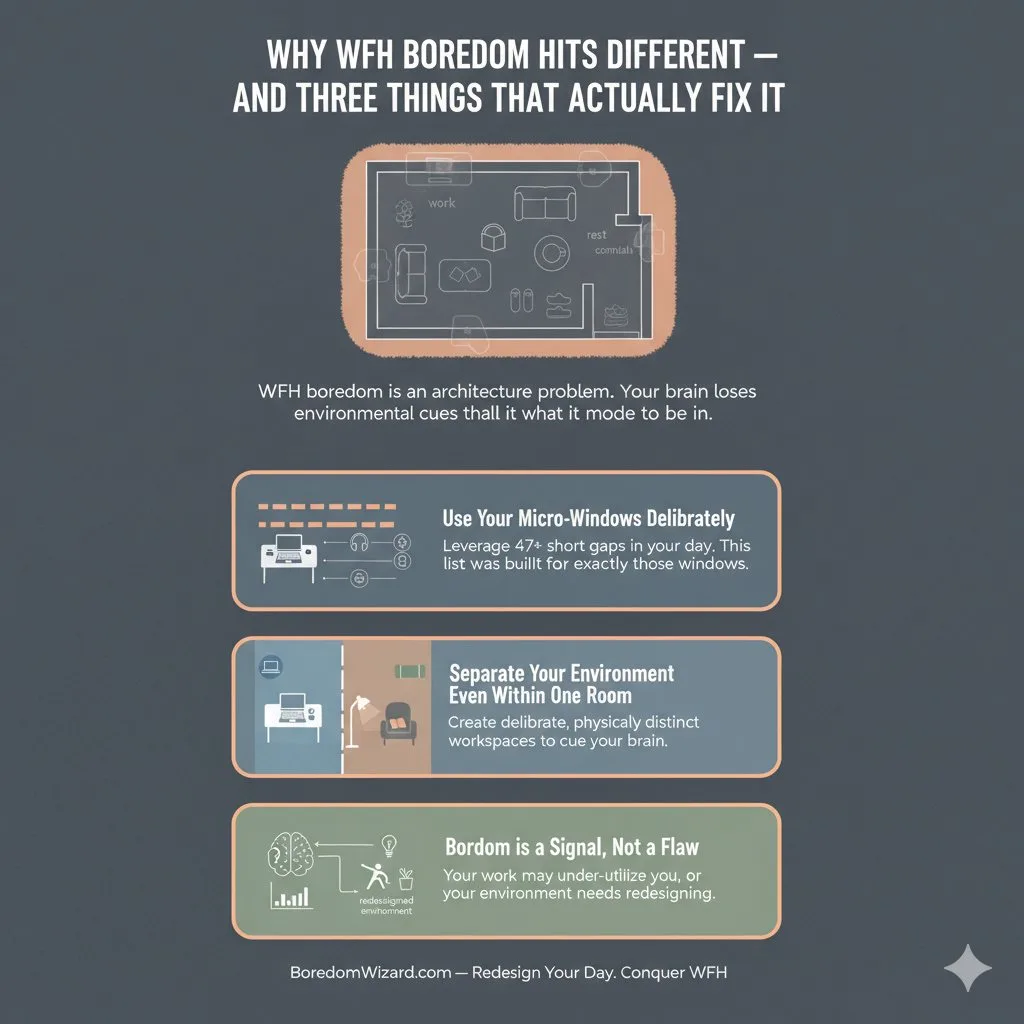
Quick Answer: Why WFH Boredom Hits Different — And Three Things That Actually Fix It
The 45 best things to do when bored working from home include composing haiku status reports, prototyping sticky-note dashboards on your wall, doing 10 laundry basket squats between meetings, meal prepping lunch in the gap between calls, curating inspiration folders for future projects, stargazing from your desk at dusk, learning Origami during a dead meeting, taking a 15-minute bike ride as a replacement commute, reverse-engineering a competitor’s email, and 36 more ideas organized into 9 categories covering brain breaks, desk exercises, kitchen projects, screen-based cures, creative micro-projects, home optimization, learning, connection, and after-hours resets.
Indeed listed 13 generic tips. Good Housekeeping covered the basics. This list goes past “change your scenery” and “make a to-do list” into specific, actionable, time-bound activities that fit into the fractured rhythm of remote work — activities you can start in 2 minutes between meetings and finish before your next Slack notification arrives. 45 things to do when bored working from home, organized by what your brain actually needs right now.
The Remote Boredom Map — 9 Categories for 9 Flavors of Working-From-Home Boredom
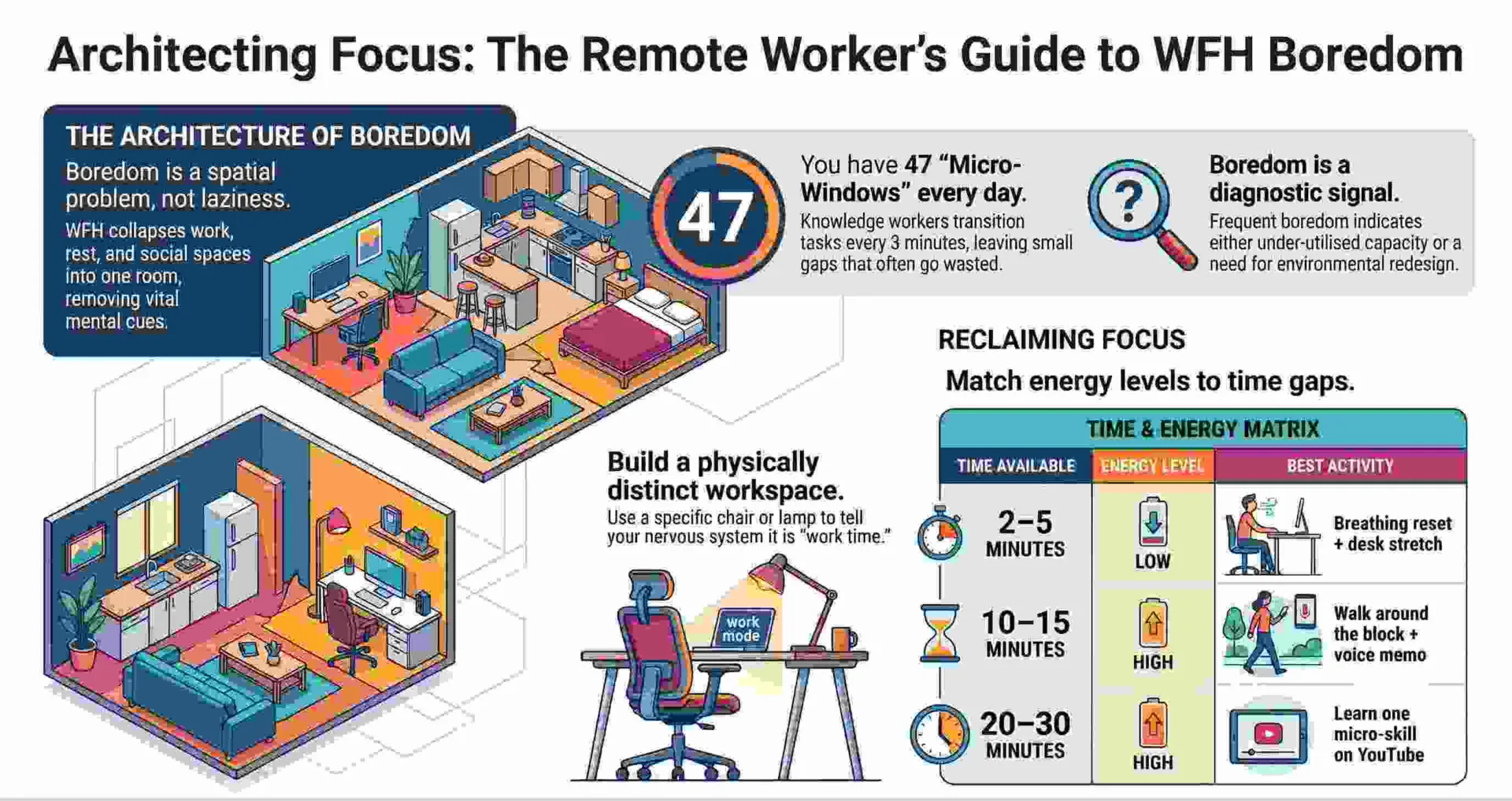
Remote work boredom is not one thing. It is 9 different things depending on the time of day, your energy, and what your brain is craving.
| Category | When It Hits | Activities |
| Brain Breaks Between Zoom Calls | Between meetings, mental fatigue, need a reset | 1–5 |
| Desk Movement Without Leaving Your Chair | Stiff body, energy slump, 2 PM crash | 6–10 |
| Kitchen & Food Projects During Lunch | Lunch break, afternoon gap, meal boredom | 11–15 |
| Screen Cures That Look Like Work | Cannot leave desk but brain is checked out | 16–20 |
| Creative 10-Minute Micro-Projects | Creative itch, hands want something to do | 21–25 |
| Home Optimization Micro-Tasks | Productive restlessness, want visible results | 26–30 |
| Learn Something in 15 Minutes | Brain hungry, want stimulation, not entertainment | 31–35 |
| Connection for Lonely Remote Workers | Isolation boredom, missing people | 36–40 |
| After-Hours Reset Activities | Workday over, still in work mode, cannot switch off | 41–45 |
Jump to the category that matches your current state. You do not need all 45. You need the 5 that match right now.

Brain Breaks Between Zoom Calls
Your brain needs a pattern interrupt between calls. Not scrolling — that is not a break, that is a different kind of screen fatigue. These 5 take 2 to 5 minutes and genuinely reset your attention.
1. Step Outside for 90 Seconds of Sunlight
Open your front door, stand in direct sunlight for 90 seconds, and come back inside. The Vitamin D exposure and change in light temperature resets your circadian alertness. 90 seconds is enough to shift your mood without losing your workflow. Do this between every meeting. Your eyes and your brain will thank you by 3 PM.
2. Make a Cup of Tea or Coffee With Full Attention
Boil water, choose the tea, pour it, watch the steam, smell it, drink the first sip standing up. Not while checking Slack. Not while reading email. Full attention on the process. The ritual takes 3 minutes and functions as a micro-meditation. The focus required to be present with a single sensory experience resets the mental fatigue that back-to-back screens create.
3. Write Down 3 Things You Accomplished in the Last 2 Hours
Open a note. Write 3 things you finished since your last break. This takes 60 seconds and counteracts the “I did nothing today” feeling that remote work amplifies. The act of documenting progress reframes the morning from “boring” to “productive in ways I wasn’t tracking.” Keep a running daily log and you have performance review material by December.
4. Do a 2-Minute Breathing Reset
Breathe in for 4 counts, hold for 4, breathe out for 6. Repeat 5 times. This activates your parasympathetic nervous system and lowers the cortisol spike that Zoom fatigue creates. Headspace and Calm both have free 2-minute breathing exercises, but you do not need an app. You need a timer and your lungs. If mindfulness interests you, our guide on things to do when bored and anxious covers the overlap between remote-work restlessness and worry.
5. Look Out Your Window and Name 5 Things You See
Stand at a window. Name 5 specific things you see: a red car, a moving cloud, a bird on a wire, a wet sidewalk, a neighbor’s flag. This is a grounding technique borrowed from anxiety management, and it works against boredom for the same reason: it pulls your attention out of the internal loop (“I’m bored, I’m stuck, I’m flat”) and anchors it to external reality. 30 seconds. 5 things. Boredom breaks.
Desk Movement Without Leaving Your Chair
Your body is stiff because it has been in the same position for 3 hours. These exercises work from a chair, under a desk, or next to your laptop. If you want a deeper set of options, our guide on exercises to do when bored has 20 full routines including desk-specific movements.
6. Seated Calf Raises — 20 Reps, Invisible
Place your feet flat on the floor. Raise both heels as high as possible. Hold 1 second. Lower slowly. Repeat 20 times, 3 sets. Nobody on Zoom can see this. 60 reps of calf work improves circulation, reduces leg stiffness, and burns a small number of calories — all while you are on a call.
7. Desk Push-Ups — 10 Reps Between Tasks
Stand up. Place your palms on the edge of your desk. Lower your chest to the desk edge. Push back up. 10 reps. This takes 30 seconds and engages your chest, shoulders, and triceps. Do a set every time you finish a task. 5 tasks per day = 50 push-ups without a single gym visit.
8. Chair Spin Lunges — Alternate Legs, 5 Per Side
Stand next to your office chair. Step forward into a lunge, using the chair seat for balance. Alternate legs, 5 per side. Chair spin lunges engage your quads, glutes, and core. The chair provides stability for people who find free-standing lunges difficult. 10 total lunges in 45 seconds.
9. Doorframe Stretch — 30 Seconds Per Side
Stand in a doorframe. Place your forearm vertically on the frame. Lean forward until you feel a stretch across your chest. Hold 30 seconds. Switch sides. This stretch reverses the hunched posture that 4 hours of laptop use creates. Your shoulders open, your chest expands, and your breathing immediately improves.
10. Laundry Basket Squats — 10 Reps Per Load
Hold a full laundry basket at chest height. Squat 10 times before carrying it to the machine. The basket weighs 10 to 20 pounds — enough resistance to engage your legs and core. Do this every time you do laundry and you have a recurring weighted squat session embedded in a chore you were already doing.
Kitchen & Food Projects During Your Lunch Break
11. Meal Prep Tomorrow’s Lunch While Eating Today’s
While your current lunch heats up, prep tomorrow’s: chop vegetables, marinate protein, portion snacks. This takes 10 minutes and eliminates tomorrow’s lunch-break decision fatigue. The future version of you who opens the fridge to a prepped meal will feel like they have a personal chef.
12. Bake a Single-Serving Cookie in a Mug
Mix 1 tbsp butter, 1 tbsp sugar, 1 tbsp brown sugar, 1 egg yolk, a splash of vanilla, 3 tbsp flour, and a handful of chocolate chips in a mug. Microwave 40 seconds. You have a warm cookie in under 3 minutes. Whip up this recipe when the 2 PM slump hits and your brain needs sugar and serotonin. Good Housekeeping’s Selena Barrientos calls mug recipes the “best 3-minute kitchen hack for remote workers.”
13. Make Homemade Lemonade or Iced Tea From Scratch
Squeeze 2 lemons, mix with water and honey or sugar, add ice. Or brew a strong tea, chill it, and add lemon. Fresh drinks take 5 minutes and taste significantly better than whatever has been sitting in your fridge since Monday. The act of making a drink with your hands breaks the screen trance.
14. Organize Your Spice Rack or Pantry Shelf — One Shelf Only
Pull everything off one pantry shelf. Check expiration dates. Throw out what is old. Wipe the shelf. Put everything back organized. 10 minutes. One shelf. Visible result. The clean shelf will make you disproportionately happy every time you open the pantry for the rest of the week.
15. Start a Kitchen Windowsill Herb Garden
Buy 3 herb pots — basil, rosemary, mint — from a grocery store for under $10 total. Place them on a windowsill. Water daily. The plants grow visibly each day, which gives your kitchen a small daily change in a home that otherwise looks the same every morning. Use the herbs in cooking. For more plant projects, our guide on things to do when bored as a stay-at-home mom has indoor gardening ideas.
Screen-Based Boredom Cures That Look Like Work
You cannot leave your desk. Your screen is visible. You need something that cures boredom and survives a glance from a manager on a screen share. If you want more screen-safe professional activities, our guide on things to do when bored at work has 20 options with stealth ratings.
16. Audit Your Digital Clutter — Desktop, Downloads, Tabs
Delete 20 files from your Downloads folder. Close every tab older than 24 hours. Sort your desktop into 5 folders. Audit digital clutter as a 10-minute speed challenge. Set a timer. The result is a cleaner workspace that reduces the visual noise contributing to your boredom. On a screen share, this looks like peak organization.
17. Label Inbox Zero — Sort 30 Emails Into Folders
Create 5 email folders: Action Needed, Waiting On, Reference, Archive, Delete. Sort 30 emails from your inbox into the right folder. Label inbox zero is not about answering emails. It is about categorizing them so your inbox stops looking like a wall of unprocessed anxiety. 10 minutes. 30 emails. Visible progress.
18. Reverse-Engineer a Competitor’s Email or Landing Page
Find a competitor’s newsletter or landing page. Open a document. Write down: what the headline promises, how the copy is structured, what the call-to-action is, and what you would steal. Reverse-engineer competitor emails as a 15-minute competitive intelligence exercise. The output is useful. The process is engaging. On screen, it looks like market research.
19. Curate an Inspiration Folder for Future Projects
Create a folder on your desktop or in Notion called “Inspiration.” Every time you see a good design, a smart email subject line, a clever product feature, or an article that sparks an idea — save it there. Curate inspiration folders as a running collection. In 3 months, the folder becomes your best brainstorming resource. Pinterest has always done this for personal life. Do it for professional life too.
20. Compose Haiku Status Reports for Your Own Amusement
Write your weekly status update in 5-7-5 syllable haiku format before translating it back into normal English. Example: “Slides shipped on Wednesday / the client changed their mind twice / deadlines hold like sand.” Compose haiku reports as a creative writing exercise disguised as work documentation. The haiku forces you to distill the week’s work into its essence. The translation back to normal gives you the real report. Both versions are useful.
Creative 10-Minute Micro-Projects
21. Learn One Origami Fold From YouTube
Search YouTube for “origami crane tutorial.” Fold one from a piece of printer paper. Takes 8 minutes. Origami works between meetings because it requires focus (which resets your brain) and produces a physical object (which satisfies your hands). Keep the finished pieces on your desk. After a week, you have a small paper zoo.
22. Sketch a Micro-Idea on a Sticky Note
Take a sticky note. Sketch one idea: a product feature, a logo concept, an app screen, a room layout, a tattoo, a T-shirt design. Sketch micro-ideas as a daily creative practice. The constraint of the sticky note’s size forces simplicity. Some of the best product ideas at companies start as sticky-note sketches. Yours might too.
23. Design a Single-Slide Pitch for Something You Care About
Open a blank slide. Create a one-slide pitch for: a book you love, a side project idea, a process improvement, a vacation argument. One slide. One visual. One message. Design single-slide pitches as a presentation skill exercise. If you can explain an idea in one slide, you understand it. If you cannot, you have found the gap in your thinking.
24. Write a 100-Word Micro Fiction Story
Pick a prompt: the last email ever sent, a meeting that goes wrong in a supernatural way, a Slack message from the future. Write the story in exactly 100 words. The constraint forces every word to earn its spot. This takes 8 to 12 minutes and exercises a different part of your brain than work tasks use. If micro fiction interests you, our guide on things to do when bored by yourself has more solo writing activities.
25. Prototype a Sticky-Note Dashboard on Your Wall
Use 5 to 10 sticky notes to build a physical dashboard on the wall next to your desk. Categories: This Week’s Priorities, Waiting On, Ideas, Wins, Next. Prototype sticky-note dashboards as a physical project management system. Move notes between categories as the week progresses. The tactile satisfaction of peeling and placing is more engaging than dragging cards in Trello, and the visual is always in your peripheral vision.
Home Optimization Micro-Tasks
Your home is your office now. Making it better makes your workday better. Each task takes under 15 minutes and produces a visible improvement. For more home projects, our guide on home decor ideas to explore when bored has 53 ideas.
26. Declutter One Drawer — The Junk Drawer, Specifically
Pull everything out. Trash what is trash. Find homes for what is not. Wipe the drawer. Put back only what belongs. 10 minutes. One drawer. The result is disproportionately satisfying. Every time you open it for the rest of the month, you feel a small wave of competence.
27. Wipe Down Your Desk and Screen
Spray your screen with screen cleaner. Wipe your desk surface. Organize your pens, cables, and chargers. 5 minutes. The visual difference is immediate. A clean workspace reduces the mental noise that makes remote work feel cluttered and overwhelming.
28. Move One Plant to a New Location
Pick up a houseplant. Move it to a different spot. A shelf, a windowsill, your desk. The micro-change alters the visual landscape of the room you work in 8 hours a day. Your brain registers the change as novelty, and novelty breaks boredom. Move one plant per week and your room evolves without buying anything new.
29. Fix One Small Thing You Have Been Ignoring
The loose doorknob. The crooked frame. The light bulb that has been out for 3 weeks. The squeaky hinge. Pick one. Fix it. 5 minutes. The relief of removing a background irritant is worth more than the 5 minutes invested. Home maintenance is procrastination fuel — use your work boredom to finally do it.
30. Set Up Your Workspace for Better Posture
Raise your laptop on a stack of books so the screen is at eye level. Push your chair in so your forearms rest flat. Adjust your seat height so your feet are flat on the floor. These 3 adjustments take 2 minutes and reduce the neck and back pain that makes afternoon work boredom feel physical. Ergonomic optimization is one of the most productive micro-tasks you can do during a boring afternoon.
Learn Something New in 15 Minutes
You have a laptop, Wi-Fi, and 15 unscheduled minutes. These learning activities fit inside a gap and build a skill that compounds. For more learning-based boredom cures, our guide on things to do when bored for adults has professional development activities.
31. Complete One Duolingo Lesson
Pick a language. Complete one lesson. 8 minutes. Over a month of daily lessons, you construct basic sentences. Language learning activates pattern recognition, memory, and auditory processing — the exact brain regions that repetitive work tasks leave idle.
32. Watch One YouTube Tutorial on a Professional Skill
Search YouTube for “[your industry] tutorial 10 minutes.” Watch one. Take 3 notes. Topics: advanced Excel formulas, Notion templates, email copywriting, data visualization, presentation design. The video looks like professional development on screen. The learning is real. One 10-minute video per day for a month is 5 hours of skill-building.
33. Read One Long-Form Article in Your Industry
Go to your industry’s top publication. Read one article fully. Not scanning — reading. Take 2 notes about what you agree with and 1 about what you disagree with. This takes 10 to 15 minutes and produces genuine professional insight. Steve Jobs famously said that creativity is connecting things — reading broadly in your industry provides the things to connect.
34. Memorize 5 Keyboard Shortcuts for Your Most-Used Software
Google “keyboard shortcuts [your software].” Pick 5 you have never used. Practice each one 10 times. In a week you are noticeably faster. The gap between a shortcut user and a mouse-click user is 15 to 30 minutes per day. Build that speed during boring minutes.
35. Take a Free Module on Skillshare, Coursera, or YouTube
Pick a topic unrelated to your job: photography, graphic design, cooking, psychology, music theory. Complete one module. 15 to 20 minutes. Learning something outside your professional lane makes your brain feel alive in a way that work-related learning does not. The cross-pollination often produces unexpected professional benefits months later.
Connection Activities for Lonely Remote Workers
Remote work boredom is often isolation boredom wearing a disguise. If the silence of your home office feels personal rather than peaceful, these 5 activities address the loneliness directly. If isolation is a persistent issue, our guide on things to do when bored and lonely covers it in depth.
36. Send a 3-Sentence Check-In Message to a Coworker
Open Slack or email. Pick someone you have not spoken to in 2 weeks. Write 3 sentences: how you are, what you are working on, and one genuine question about them. This takes 2 minutes and rebuilds the casual connection that remote work erodes. Most remote workers feel isolated but do not initiate contact. Be the one who does.
37. Schedule a Virtual Coffee Chat With Someone Outside Your Team
Message someone in a different department. Say: “Hey, I’m [name] from [team]. Want to do a 15-minute virtual coffee sometime this week?” Cross-functional coffee chats build relationships that make work feel less isolating and often surface opportunities, insights, and allies you would never find inside your own team.
38. Call a Friend or Family Member for 10 Minutes
Not a text. A phone call. Call someone during a break: a parent, a college friend, a sibling. 10 minutes of voice-to-voice connection provides more social nourishment than 3 hours of text messaging. The phone call is the single most underused boredom cure for remote workers. If you are working from home alone and the loneliness extends beyond the workday, our guide on things to do when bored alone has 27 ideas for solo time.
39. Write a Gratitude Email to Someone Who Helped You This Month
Pick someone who made your work easier recently. Write 3 sentences: what they did, why it mattered, and thank you. Send it. The email takes 3 minutes. The relationship benefit lasts months. Gratitude emails are one of the fastest mood-lifters available in a remote setting because they shift your attention from what is boring to what is good.
40. Join a Slack Community or Discord Server in Your Industry
Search for “[your industry] Slack community” or “[your interest] Discord server.” Join one. Introduce yourself. Remote workers who participate in professional communities outside their company report significantly lower isolation and higher job satisfaction. The community provides the ambient social energy that an office used to. Reddit’s work-from-home communities (r/remotework, r/digitalnomad) are also worth exploring.
Natty’s take:
I have worked from home for years while raising 4 kids and running businesses. The loneliest version of remote work is the one where you stop reaching out. You wait for people to contact you, and when they do not, you interpret the silence as evidence that you are invisible. You are not invisible. You are remote. The fix is identical to the fix for boredom: take one action. Send one message. Make one call. The silence breaks the moment you do.
After-Hours Reset Activities
The workday is over. Your brain has not switched off. You are still in the room where you worked, sitting in the chair where you worked, looking at the screen where you worked. These 5 activities create a boundary between work mode and life mode. If the post-work boredom extends into evening restlessness, our guide on things to do when bored at home has 50+ after-work ideas.
41. Take a 15-Minute Fake Commute — Walk, Bike, or Drive Around the Block
When work ends, leave your house. Walk, bike, or drive for 15 minutes. Come back. This is a fake commute — a physical transition between work space and home space. Your brain needs a boundary, and the commute used to provide it. Without it, work and home blend into the same feeling. A 15-minute bike ride or walk replaces the commute’s psychological function. The fresh air and movement are a bonus. Nike Training Club and Peloton both have 15-minute walking and cycling cooldowns designed for exactly this transition.
42. Change Your Clothes Immediately After Closing Your Laptop
The moment you close your laptop, change into non-work clothes. Sweatpants, a favorite T-shirt, something you would never wear on a Zoom call. The physical act of changing clothes signals to your brain that the work portion of the day is over. Catherine Falls Commercial (Catherine Falls Commercial / Getty Images) has photographed this transition ritual for multiple publications. The costume change matters more than you think.
43. Do a 10-Minute Kitchen Reset Before Dinner
Wipe counters. Load or unload the dishwasher. Set the table. A 10-minute kitchen reset transitions you from work mode to home mode through physical activity and environmental change. The clean kitchen signals “home” to your brain in a way that closing a laptop does not. The reset also means dinner prep starts in a clean space, which reduces the friction that makes remote workers order takeout 4 nights per week.
44. Watch One Episode of Something That Has Nothing to Do With Work
Pick a show on Netflix, a movie, or a documentary that has zero connection to your professional life. A nature documentary about the Amazon rainforest. A film about Impressionism. A comedy that makes you laugh. The content does not matter. What matters is that it is not work-adjacent. Your brain needs non-work input after 8 hours of work input. Give it something completely unrelated.
45. Set Up Tomorrow Before You Relax Tonight
Spend 5 minutes writing tomorrow’s to-do list, setting out tomorrow’s work clothes, and organizing your desk for morning. This takes 5 minutes and eliminates the morning decision fatigue that makes the next work-from-home day start slow. The evening setup also creates a clean psychological endpoint: once the list is written and the desk is organized, work is officially done. The rest of the evening is yours. If you want a structured approach to managing your daily routine, our guide on how to build a dopamine menu when bored provides a framework for choosing activities by reward type. And if the post-work restlessness comes with a broader sense of purposelessness, our guide on things to do when bored by yourself has 30 solo activities designed for exactly this kind of directionless evening energy.
Quick-Reference: All 45 Activities by Time and Category
| # | Activity | Time | Category |
| 1 | 90-Second Sunlight Break | 90 sec | Brain Break |
| 2 | Mindful Tea/Coffee Making | 3 min | Brain Break |
| 3 | 3 Accomplishments Log | 60 sec | Brain Break |
| 4 | 2-Minute Breathing Reset | 2 min | Brain Break |
| 5 | Window Grounding (5 Things) | 30 sec | Brain Break |
| 6 | Seated Calf Raises | 2 min | Desk Movement |
| 7 | Desk Push-Ups | 30 sec | Desk Movement |
| 8 | Chair Spin Lunges | 45 sec | Desk Movement |
| 9 | Doorframe Stretch | 1 min | Desk Movement |
| 10 | Laundry Basket Squats | 2 min | Desk Movement |
| 11 | Meal Prep Tomorrow’s Lunch | 10 min | Kitchen |
| 12 | Mug Cookie | 3 min | Kitchen |
| 13 | Homemade Lemonade | 5 min | Kitchen |
| 14 | Organize One Pantry Shelf | 10 min | Kitchen |
| 15 | Windowsill Herb Garden | 15 min | Kitchen |
| 16 | Digital Declutter Sprint | 10 min | Screen Cure |
| 17 | Inbox Zero Labeling | 10 min | Screen Cure |
| 18 | Reverse-Engineer Competitor | 15 min | Screen Cure |
| 19 | Curate Inspiration Folder | 5 min | Screen Cure |
| 20 | Haiku Status Reports | 5 min | Screen Cure |
| 21 | Origami Fold | 8 min | Creative |
| 22 | Sticky-Note Micro-Sketch | 3 min | Creative |
| 23 | Single-Slide Pitch | 10 min | Creative |
| 24 | 100-Word Micro Fiction | 10 min | Creative |
| 25 | Sticky-Note Dashboard | 10 min | Creative |
| 26 | Declutter One Drawer | 10 min | Home Opt. |
| 27 | Wipe Desk and Screen | 5 min | Home Opt. |
| 28 | Move One Plant | 2 min | Home Opt. |
| 29 | Fix One Small Thing | 5 min | Home Opt. |
| 30 | Ergonomic Workspace Setup | 2 min | Home Opt. |
| 31 | Duolingo Lesson | 8 min | Learning |
| 32 | YouTube Tutorial | 10 min | Learning |
| 33 | Industry Article Read | 15 min | Learning |
| 34 | 5 Keyboard Shortcuts | 5 min | Learning |
| 35 | Skillshare/Coursera Module | 15 min | Learning |
| 36 | 3-Sentence Coworker Check-In | 2 min | Connection |
| 37 | Virtual Coffee Chat Setup | 3 min | Connection |
| 38 | Phone Call to Friend/Family | 10 min | Connection |
| 39 | Gratitude Email | 3 min | Connection |
| 40 | Join Slack/Discord Community | 10 min | Connection |
| 41 | 15-Minute Fake Commute | 15 min | After-Hours |
| 42 | Change Clothes Post-Work | 2 min | After-Hours |
| 43 | 10-Minute Kitchen Reset | 10 min | After-Hours |
| 44 | Watch Non-Work Content | 25–60 min | After-Hours |
| 45 | Set Up Tomorrow | 5 min | After-Hours |
How to Pick the Right Activity in 10 Seconds
1. What does your brain need right now?
Reset: 1–5. Movement: 6–10. Food: 11–15. Screen-safe cure: 16–20. Creative outlet: 21–25. Visible progress: 26–30. Learning: 31–35. Human connection: 36–40. Post-work transition: 41–45.
2. How much time do you have?
30 seconds: sunlight, window grounding, plant move. 2–3 minutes: breathing, desk push-ups, calf raises, gratitude email, mug cookie. 10 minutes: inbox labeling, digital declutter, drawer organizing, origami, phone call. 15 minutes: fake commute, article read, course module, meal prep.
3. Are you bored or burned out?
If the boredom has lasted weeks and comes with dread, cynicism, or emotional exhaustion, you are not bored — you are burning out. Activities 36 through 40 (connection) and 41 through 45 (boundaries) address it partially. But burnout does not fully respond to activity lists. It responds to rest, support, and change. If the emotional weight is significant, our guide on things to do when feeling depressed and bored addresses the overlap between boredom and emotional heaviness. And if post-breakup boredom is compounding your work-from-home isolation, our guide on things to do when bored after a breakup covers that specific intersection.
What Working-From-Home Boredom Is Actually Telling You
Working-from-home boredom is a transition problem, not a task problem. You have enough to do. The boredom is not about volume of work. It is about the absence of the environmental cues that used to break your day into distinct chapters: the commute, the coffee run, the walk to a meeting room, the lunch with a coworker, the commute home. Those transitions created psychological variety inside a single day. Remote work removed them all, and what remains is one long, undifferentiated stretch of hours in the same room.
Your day has no chapters. The fix is not more work. It is more transitions. Every category in this article — brain breaks, desk movement, kitchen projects, creative bursts, learning moments, connection rituals, after-hours resets — is a transition in disguise. Each one creates a boundary between one part of your day and the next.
Your body is too still. Remote workers sit 2 to 3 hours longer per day than office workers because the incidental movement (walking to meetings, to the parking lot, to the kitchen) disappears. Activities 6 through 10 and activity 41 (fake commute) address this directly. If you want a full library of desk-bound exercise options, our guide on exercises to do when bored has 20 movements including desk-specific routines. And if you want to build daily movement into a structured habit, our 30-day digital detox challenge includes physical activity targets alongside screen reduction.
More BoredomWizard Guides for Every Mood, Season, and Situation
By Location: [Things to Do When Bored at Home: 50+ Creative Ideas That Actually Work] · [20 Things to Do When Bored in Your Room] · [20 Things to Do When Bored at Work] · [20 Things to Do When Bored at School] · [50 Things to Do When Bored in Class] · [20 Things to Do When Bored in a Waiting Room] · [25 Things to Do When Bored in a Car] · [30Things to Do When Bored on a Plane] · [30 Things to Do When Bored on Computer]
By Season: [50 Things to Do When Bored in Summer] · [50 Things to Do When Bored in Winter] · [30 Things to Do in Fall When Bored] · [20 Things to Do When Bored in Spring] · [50 Things to Do When Bored on a Rainy Day] · [52 Things to Do on a Snow Day When Bored] · [25 Things to Do When Bored During Holiday]
By Who You Are: [Things to Do When Bored for Adults] · [Things to Do When Bored for Teens] · [Things to Do When Bored for Kids] · [Things to Do When Bored: College Student Edition] · [Things to Do When Bored: Stay-at-Home Mom Edition] · [Things to Do When Bored After Retirement]
By Situation: [Things to Do When Bored by Yourself] · [Things to Do When Bored Alone] · [Things to Do When Bored with Friends] · [25 Things to Do at a Friend’s House] · [Things to Do at a Sleepover] · [50 Things to Do When Bored on Weekends] · [25 Things to Do When Bored at Night] · [37 Things to Do When Tired and Bored] · [20Productive Things to Do When Bored and Sick] · [49 Things to Do When Feeling Depressed and Bored] · [49 Things to Do Instead of Doomscrolling] · [29 Things to Do When Feeling Narcoleptic and Bored] · [37 Exercises to Do When Bored] · [53 Home Decor Ideas to Explore When Bored].[Books to read when bored].[Things to do cook when bored].[Fun things to do when bored].[Personal care products to explore when bored].[Tattoo ideas to explore when feeling bored and doomscrolling]. [Upcoming Car Models to explore when feeling bored].[Things to do when bored with no money]. [Things to do when bored with ADHD].[Things to do when bored after breakup]. [Things to do when bored on phone].[Things to do when bored and anxious]. [How to build a dopamine menu]. [Build a 30-Days Digital Detox Challenge].
Written by Natty O Lewis, Mental Health & Wellness Coach.